

Question
Help needed to format a Warning and Caution background.
Hi Community,
(using FrameMaker 2019)
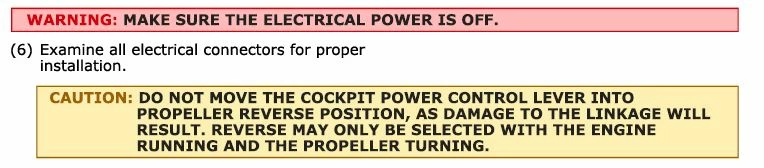
I would like some help in formatting a particular style of background for a WARNING and CAUTION .
I have created a style which I set up in the paragraph designer and saved in the catalog that works well, thats no problem. I used the 'Numbering' tab in the designer to automatically put in the 'WARNING' at the paragraph begining.
BUT, the detail I can't get is the bold line around the background, like in the sample attached. I've set up the background using a Pgf.Box with the right color but I really need that bold border. Anyone have any ideas if or how I can achieve this? Thank you. Mark.
Warning & Caution Sample:
My Warning & Caution background so far:



 AdChoices