
Known Participant
November 14, 2023
Answered

Highest level headings on odd-numbered pages

  • November 14, 2023
  • 4 replies
  • 1645 views

FrameMaker forces heading level 1-chapters to start on pages with even numbers, and I don't know why or how to make them start on the next available page, even if it is an odd number.

I created my chapters by letting FrameMaker convert Word documents. I don't know if that has something to do with it, although the headings could start anywhere in Word. I would appreciate any help.
This topic has been closed for replies.
Correct answer FrameMaker-dk

I got rid of the empty pages in the one-page chapters. However, the problem remains in the multipage chapters. I apply the setting “Delete Empty Pages” to each one of the chapters. The empty pages are deleted and everything looks fine. I save the chapters. After an update of the book, FM adds empty pages and changes the setting back again to “Make Page Count Even”. Even if I change the setting to "Make Page Count Odd", FM changes the setting back to event count and adds empty pages after a book update.


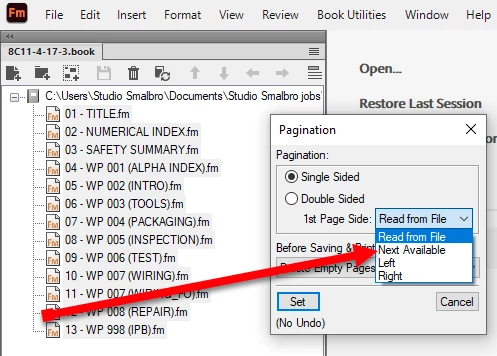
This happen because you need to select all the files in the book and then apply a pagination which lets FrameMaker pick the next available page. Like this:


4 replies

Barb Binder
Community Expert
Community Expert
November 15, 2023

Hi Peter:


Can you clarify the words "heading Level-1 chapters"? Do you mean each chapter in the book window starts on even pages? Or are you referring top level heads within a single Fm file? 


If the latter, see @FrameMaker-dk's answer. Start "top of page" will force the paragraph to the top of the next available page: left or right. If that isn't working for you, please show us at least a two-page view with your cursor in your top level heading, text symbols visible, Paragraph Designer open and Pagination properties visible so that we can see your settings. 


~Barb

~Barb at Rocky Mountain Training
Known Participant
November 15, 2023

Hi Barb,

In the picture, heading 7 Product overview is a level 1 heading, my highest level of heading.

There is a T-shaped non-printing character between “7” and “Product”. I don’t know what it means.

Regarding the two-page view, I should have mentioned that the problem shows up when I create PDF files. I did a test file in the FrameMaker book file, and the top-level headings started on both odd and even pages in FrameMaker and in the PDF. The rest of the chapters had the problem with the headings in the PDF. The test file is based on one of the chapters that has the problem.

Known Participant
November 15, 2023

There's a continuation. I created a new heading 1 style and replaced the old one. It works in some cases, but not in others. Frustrating.

Maybe I should try creating new .fm files for the chapters instead of just the paragraph style.

Bob_Niland
Community Expert
Community Expert
November 14, 2023

re: FrameMaker forces heading level 1-chapters to start on pages with even numbers…

It doesn't, unless being instructed to do so by Pagination properties, Master Page Mapping (probably not your case), or some more obscure issues (keeps, widows, orphans).

re: I created my chapters by letting FrameMaker convert Word documents.

Endless entertainment. Start by inspecting all the auto-created paragraph tags.

Barb Binder
Community Expert
Community Expert
November 15, 2023

"Endless entertainment." LOL. That's the understatement of the day!


~Barb 

~Barb at Rocky Mountain Training
Community Expert
November 14, 2023

Have you tried looking into the Pagination tab of the heading in Paragraph Designer? Might be a setting there.


Bjørn Smalbro - FrameMaker.dk
Known Participant
November 14, 2023

I am using the Start setting "Top of page" which should be independent of the page numbering, I think.

Community Expert
November 14, 2023

Maybe it is a pagination setting

If you have a setting in the master page mapping table that would explain it:

https://help.adobe.com/en_US/framemaker/2019/using/using-framemaker-2019/user-guide/frm_page_layout_pl-master-and-reference-pages.html

Bjørn Smalbro - FrameMaker.dk
Jeff_Coatsworth
Community Expert
Community Expert
November 14, 2023

I think it's in your Master Page formatting - you've told it to start like that.