

How are levels determined in HTML5 outputs?
Hi Everyone,
Query from a relative newbie to HTML5 using FM2020. Apologies if this topic has been discussed before.
I am working on an FM book where the both the front cover and the rear cover are at the top level. The cover pages are needed as the book also outputs to PDF, which is free of any error.
This is the screenshot of the FM book, showing that the front cover and rear cover are at the same level.
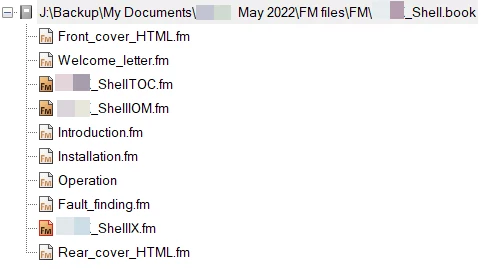
However, after generating the HTML5 output, the TOC shows front cover at top level but the rear cover way down the hierarchy.
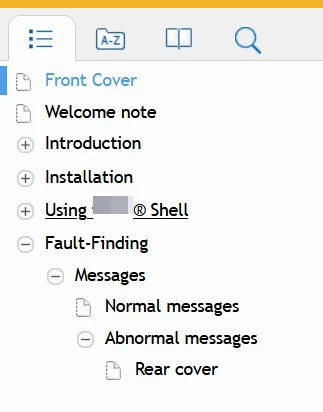
I know that the names of the FM files and the HTML5 output pages are different. [Newbie's explanation] this is because the output pages use the first (or most significant) paragraph style that is encounters in the page.
To rule out any error, I have made a copy of the front cover, renamed it as rear cover and inserted both at the top level in the book. So while identical files are used for front and rear covers, the error of different hierarchy remains.
Can you share any insights as to why the rear cover has a lower hierarchy in the HTML5 output?
Thanks in advance for your help,
Regards
Apurva


 AdChoices