
Question
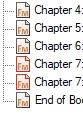
How can I change "exclude" .fm Icons to stand out from regular?
Does anyone know how to change the .fm icons so that excluded files are more visually distinct from non-excluded ones? In the example below, both Chapter 7 files are excluded, but the difference is barely noticeable. If you're color-blind, you might not be able to tell at all. I'd really like to change the excluded icon to something more obvious (like an inverted icon) instead of relying on a barely-noticable color change.
Note: I saw a reference to looking up .dll information on this issue, but that didn't help. If there's a more direct solution, please advise.
Thanks in advance.


 AdChoices