Inspiring
Mar 3, 2015 1:22 AM UTC
Answered

How can I create a horizontal line under a line of text?

Hi,

I have FM 12.0.3.424.

Does anyone know how to create a horizontal line under heading text that is the width of the page?  Similar to creating a border but without the top and sides.

Is it even possible?

thank you in advance!

This topic is closed to new replies. Start a new post to keep the conversation going.
Arnis Gubins
Arnis GubinsCorrect answer
Inspiring
Mar 3, 2015 5:35 AM UTC

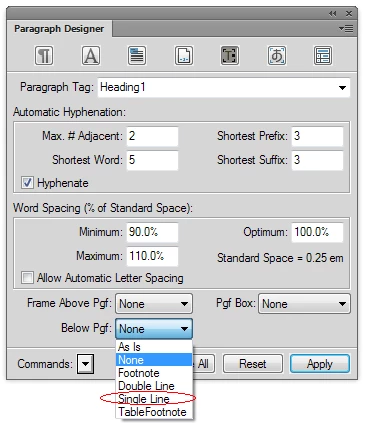
Use the "Frame Below" attribute in the Advanced tab of the Paragraph Designer for your heading tag to use a named Reference Frame from your Reference page. If you're using the default templates for your documents, you could try the Single Line selection (or make your own).

3 replies

Barb Binder
Community Expert
Community Expert
Feb 18, 2022 7:31 PM UTC

—

Translate
~Barb at Rocky Mountain Training
Arnis Gubins
Arnis GubinsCorrect answer
Inspiring
Mar 3, 2015 5:35 AM UTC

Use the "Frame Below" attribute in the Advanced tab of the Paragraph Designer for your heading tag to use a named Reference Frame from your Reference page. If you're using the default templates for your documents, you could try the Single Line selection (or make your own).

Translate
Inspiring
Mar 3, 2015 2:10 PM UTC

Worked like a charm, thanks for answering so quickly........amazing!

Translate