kaorim49702983
Participating Frequently
February 28, 2017
Answered

How can I eliminate line break after <emphasis> ???

  • February 28, 2017
  • 1 reply
  • 446 views

Hi, I am quite new to DTD, and EDD, including read/write rules and things.

The problem is, now I have made a application ready with an EDD based on a DTD, then applied it to an XML file.

(I am using ver2015)

The XML file goes...

<para>123<emphasis><termA>456</termA><emphasis>789</para>

Then displayed as...

123

456

789

However, the result I want is...

123456789

So I tried read/write rule...

writer

{

line break is 1000 characters;

}

However, still the bad line break is inserted after </termA>.

Could please anyone help this situation?

This topic has been closed for replies.
Correct answer Ian Proudfoot

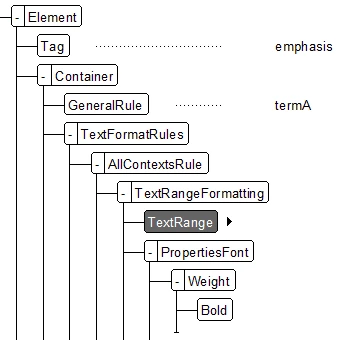
This is an easy fix. The emphasis element must be defined as a text range. It will then work as you expect. Also because you have a nested termA element that too must be a text range. In the edd it will look like this:

The read/write rule that you mention plays no part in the display of text in a structured FrameMaker document. Its purpose is to define the maximum line length for the XML files that FrameMaker creates.

1 reply

Ian Proudfoot
Ian ProudfootCorrect answer
Legend
February 28, 2017

This is an easy fix. The emphasis element must be defined as a text range. It will then work as you expect. Also because you have a nested termA element that too must be a text range. In the edd it will look like this:

The read/write rule that you mention plays no part in the display of text in a structured FrameMaker document. Its purpose is to define the maximum line length for the XML files that FrameMaker creates.

kaorim49702983
Participating Frequently
March 1, 2017

Thank you so much Ian!!!

I edited EDD as you showed me kindly and it worked!!!