
Participant
January 27, 2016
Answered

How can I embed a table into a table in FrameMaker 12?

  • January 27, 2016
  • 3 replies
  • 1423 views

I have a Step/Action table that requires embedding an If/Then table into the Action column. The Insert Table command in the Table tab is disabled when my cursor is inside the existing Step/Action table.

Where is the functionality hidden?

Any insight is much appreciated!

Kathy
    This topic has been closed for replies.
    Correct answer Stefan Gentz

    I agree with FieryPantone‌, that "Table in Table" is not the best concept. From an information architecture point of view I would avoid to create a table for a Step/Action sequence. You might want to have a look at DITA's stepsection, steps, step and task elements as an inspiration on how this concept is done there.

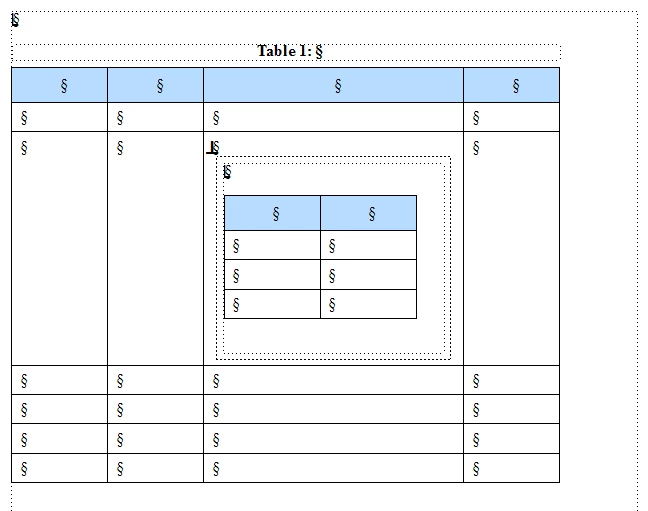
    That said: FrameMaker does not support "Table in Table". However, you can anchor a text frame within a cell and then put a table into this text frame. Like this:

    3 replies

    4everJang
    Legend
    July 20, 2020

    With structured content, the table in a text frame in a table does not work. And I truly do not believe that unstructured content is something you should even want to create or maintain in the 21st century.

    Basically, there are two options when you encounter the supposed need for a nested table:

    1. Rethink your content modeling strategy. Tables in tables should never be required.

    2. Create a single table and use straddles to make it look like a nested table. 

    After having gone through the hassle of the second solution, you will find a way to avoid these monsters.

    Stefan GentzCommunity ManagerCorrect answer
    Community Manager
    January 27, 2016

    I agree with FieryPantone‌, that "Table in Table" is not the best concept. From an information architecture point of view I would avoid to create a table for a Step/Action sequence. You might want to have a look at DITA's stepsection, steps, step and task elements as an inspiration on how this concept is done there.

    That said: FrameMaker does not support "Table in Table". However, you can anchor a text frame within a cell and then put a table into this text frame. Like this:

    Bob_Niland
    Community Expert
    Community Expert
    January 27, 2016

    re: FrameMaker does not support "Table in Table". However, you can anchor a text frame within a cell and then put a table into this text frame.

    You can also fake it by adding extra rows and columns, and doing straddles around it.

    Legend
    January 27, 2016

    Perhaps you just need to work with colspans and rowspans to set up something that looks like a table inside a table …

    fwiw, nesting tables doesn't sound like something I'd want to do – I've seen it (a long time ago) in Information Mapping files prepared in Word, and it made my toes curl :-}