Inspiring
October 3, 2018
Answered

how can i get more than 2 levels in the topic tree in the contents tab?

  • October 3, 2018
  • 2 replies
  • 516 views

i generate help, and its always only 2 levels in the contents tab. i need the h1, h2, h3, h4 all to be on a deeper level. seems like the htmlhelp function in framemaker 2019 only does 2 levels.

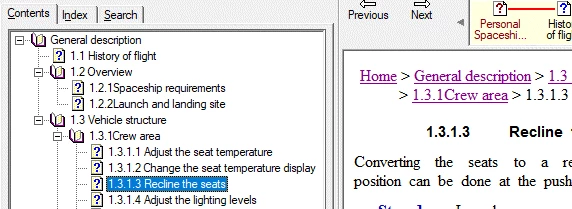
i need this:

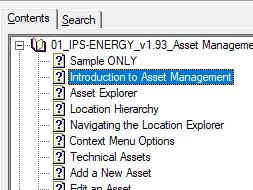
i am am getting this:
This topic has been closed for replies.
Correct answer terry_taylor_ips

same thing in responsive html5 and basic html. also, the 1000 page user guide has almost no info on the formatting of this stuff.


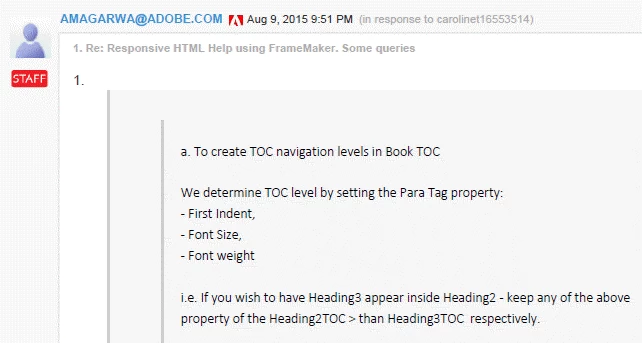
10. I found this post from  forums.adobe.com/message/7835261#7835261

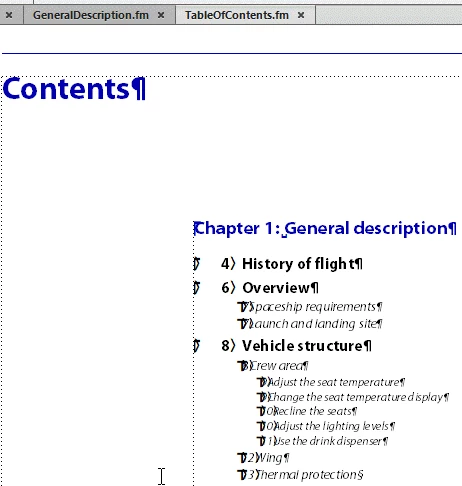
11.  so I set up my toc like this.

12. and wow, finally it works.

13. (1) not documented in adobe docs, and (2) not what I would call a very good implementation. makes me hesitate to base an entire doc/help on this.

2 replies

Hezy A
Inspiring
October 4, 2018

I wanted to add,

1. I used this often with no problem

2. did you make sure you set the settings here

3. I agree, that with the move to integrate excellent help capabilities directly from Frame (instead of having to use RoboHelp), these are not documented well.

The guides do not really tell you how to do everything that you want to do, so that you can make the help do everything that you want it to do. There are really extensive capabilities that are not fully documented.

support@Adobe people  please note

Inspiring
October 4, 2018

Thanks Zippy. I tried many things... the problem is that there are so many different settings, and so many possible combinations.

Support@Adobe: I recommend the following:

1. Document this function in the user guide.

2. Put a demo of this in the docs.

3. Put heading numbering in the user guide so that its easier to read and reference.

Jeff_Coatsworth
Community Expert
Community Expert
October 4, 2018

Remember, these are user-to-user forums - if you want to get something on Adobe's radar, use the Bug Tracker (link on the home FM page of the forum) or e-mail them at tcssup@adobe.com.

Jeff_Coatsworth
Community Expert
Community Expert
October 3, 2018

Do you require each level of heading to create a new topic? If so, check your pagination settings in the Publish pod. If it's just the appearance of the TOC, then check your FM Table of Contents - your headings need to have some indenting present in the TOC for the HTML conversion to understand that they are to be shown on different levels.

Inspiring
October 3, 2018

thanks Jeff, i did this.

3. indented in toc.

4. specified style mapping for h0, h1, h2

5. same result...

6. so i indent the headings....

7. same result

8. well, try map to html tag...

9. result

Jeff_Coatsworth
Community Expert
Community Expert
October 3, 2018

Try creating WebHelp or Responsive HTML5 help to see if there's a difference - you seem to be creating CHMs and they're ancient technology these days.