

Known Participant
Oct 16, 2023 8:07 AM UTC
Answered

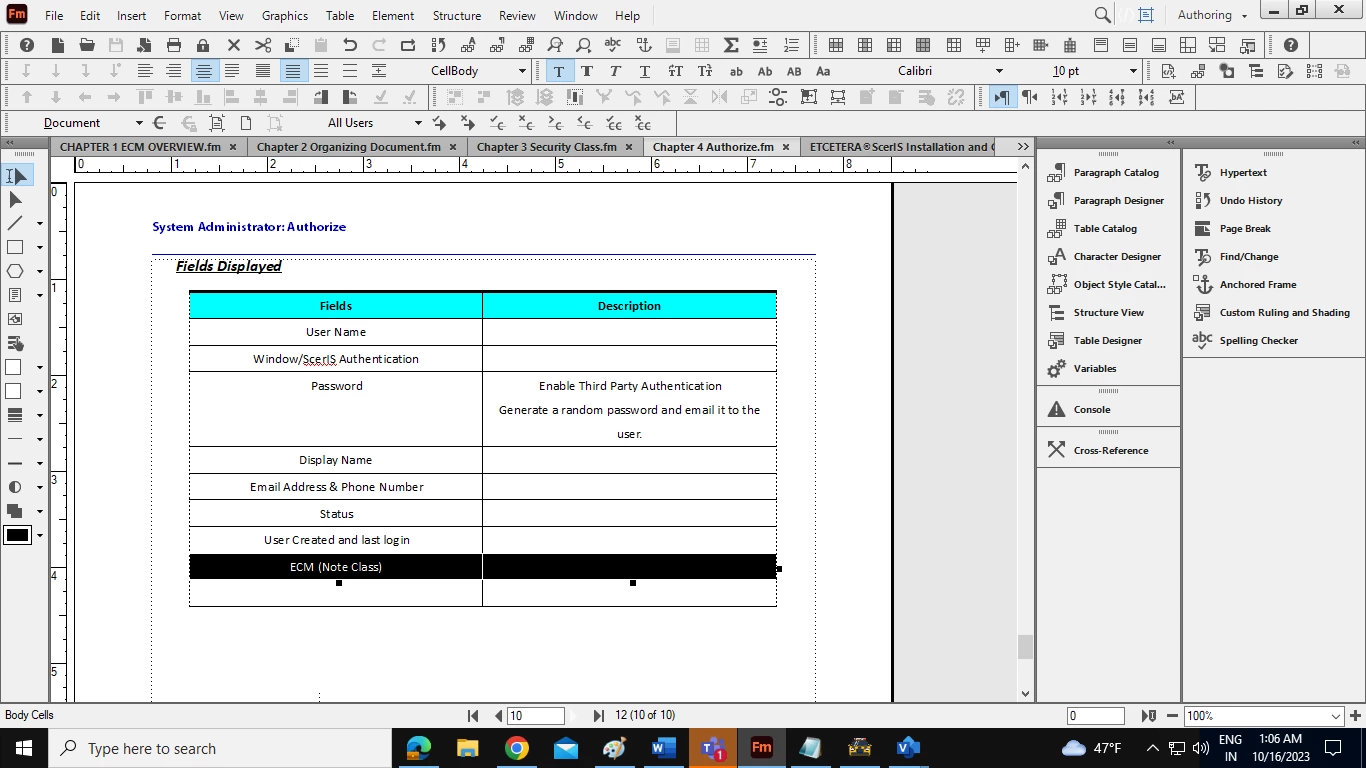
How can I merge cell in Adobe Frame Maker Document?

How can I merge cell for only one row in Adobe Frame Maker document?
 

    This topic is closed to new replies. Start a new post to keep the conversation going.
    Winfried RengCorrect answer
    Community Expert
    Oct 16, 2023 8:15 AM UTC

    Hi Amit,

    Just select the table cells which you want to merge. Of course they must be adjacent.

    Then in the Table menu click Straddle. In the Table toolbar there is also an icon for this.

    You can straddle cells horizontally and vertically.

    Best regards, Winfried

    6 replies

    Community Expert
    Oct 16, 2023 11:53 AM UTC

    Hi, @Amit Mani30445109n307 ,

    as far as I see many of your questions are relatet to basics of FrameMaker.

    So maybe it will be a good idea if you are doing a FrameMaker training where all the basics will be explained.

    This community is always willing and happy to help, but it is not a substitute for a structured training.

    Regards

    Stephan

    Translate
    Known Participant
    Oct 16, 2023 2:32 PM UTC

    Yes, I have watched many vidoes which explains basics of FM on You Tube. Also, joins Webinar. Please let me know if there there is more options to get trainings. Thanks!

    Translate
    Community Expert
    Oct 16, 2023 3:56 PM UTC

    Hi, @Amit Mani30445109n307 ,

    being honest looking at YouTube video(s) or at a webinar is not a structured training.

    A structured training consists of at least 2 - better 3 - days with a trainer with a duration of 7-8 hours.

    And then you will know about the pure basics of how to work with FrameMaker.

    To get a better, deeper knowledge - e.g. about index, reference page etc. - you need another advanced training.


    Or you are able to learn a software by reading a real good (printed) book.


    Regards

    Stephan

    Translate
    Winfried RengCommunity ExpertCorrect answer
    Community Expert
    Oct 16, 2023 8:15 AM UTC

    Hi Amit,

    Just select the table cells which you want to merge. Of course they must be adjacent.

    Then in the Table menu click Straddle. In the Table toolbar there is also an icon for this.

    You can straddle cells horizontally and vertically.

    Best regards, Winfried

    Translate
    Known Participant
    Oct 16, 2023 2:30 PM UTC

    Thanks

    Translate
