
Known Participant
July 24, 2023
Answered

How Can I not underline Bullets in Adobe Frame Maker ?

  • July 24, 2023
  • 3 replies
  • 415 views

How can I not underline Bullets in Adobe Frame Maker ?


    This topic has been closed for replies.
    Correct answer Barb Binder

    Hi Amit:


    Remember your question from the other day on how to bold auto-numbers? Same answer, only this time create a character style with underline disabled and then apply it to the bullet. 
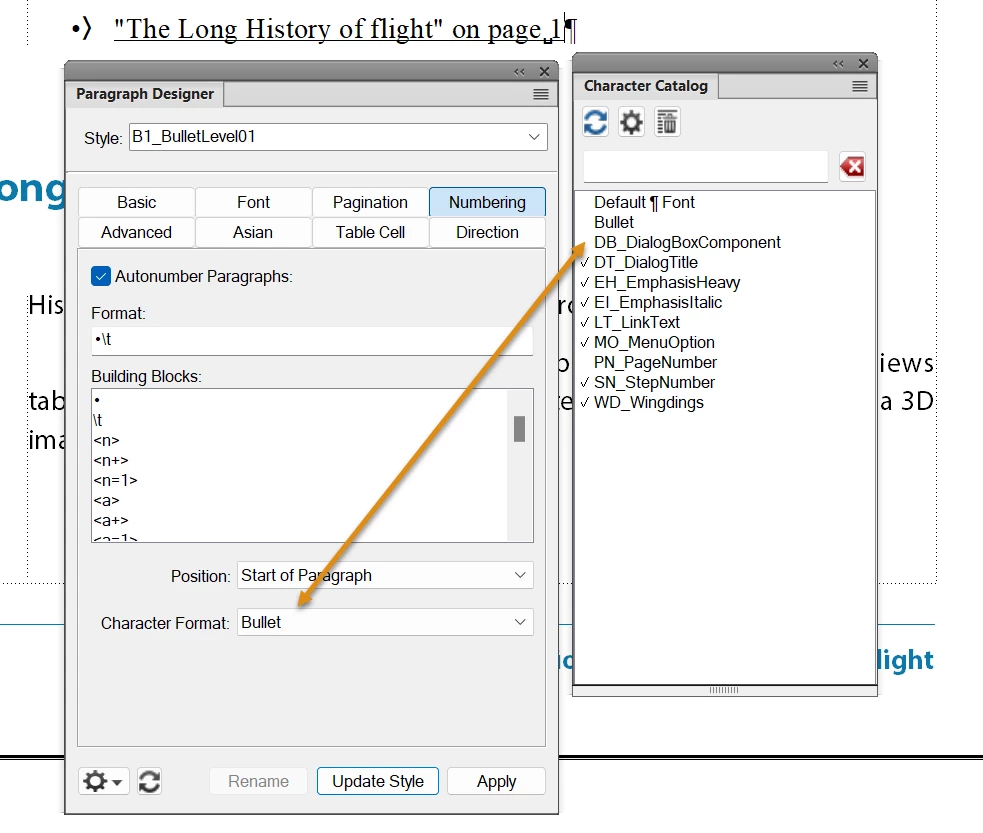
     

    ~Barb

    3 replies

    Barb Binder
    Community Expert
    Barb BinderCommunity ExpertCorrect answer
    Community Expert
    July 24, 2023

    Hi Amit:


    Remember your question from the other day on how to bold auto-numbers? Same answer, only this time create a character style with underline disabled and then apply it to the bullet. 


    ~Barb

    ~Barb at Rocky Mountain Training
    Known Participant
    July 25, 2023

    Thank You Very Much! I Got It.

    Bob_Niland
    Community Expert
    Community Expert
    July 24, 2023

    re: How can I not underline Bullets in Adobe Frame Maker ?

    Underline or not underline?

    K.Daube
    Community Expert
    Community Expert
    July 24, 2023

    Set up a characters format "underline"

    In the Paragraph designer modify your list format (have the cursur at left to the bullet symbol in the Format field):

    This does, however, underline only the bullet. It is not possible to automatically extend the underlining tot the following text.