Known Participant
November 13, 2024
Question

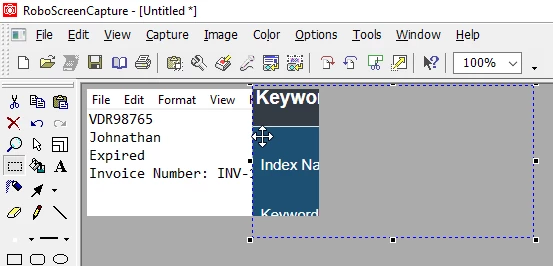
How can I paste two images side by side in RoboScreenCapture?
  • November 13, 2024
  • 3 replies
  • 448 views

Here is the sample image for reference.

    This topic has been closed for replies.

    3 replies

    Community Expert
    November 19, 2024

    Windows 11 comes with "Snipping Tool". Snipping Tool has a button "Edit in Paint". When you click the button, the screendump is transferred to Paint and in Paint you can easily assemble your pictures.

    Otherwise, I would absolutely recommend using Snagit. It is really excellent and will also video.


    Bjørn Smalbro - FrameMaker.dk
    Community Expert
    November 14, 2024

    Hi,

    Do you have any other graphics application? Almost everything would do. Even free ones like Microsoft Paint which is already installed with Windows.

    Or: Irfanview

    https://www.irfanview.com/

    Or much better and much more powerful: Gimp

    https://www.gimp.org/

    Best regards, Winfried

    Known Participant
    November 18, 2024

    Yes, I use MS Visio. But it would have been easier if RoboScreenCapture had this editing option.

    Jeff_Coatsworth
    Community Expert
    Community Expert
    November 18, 2024

    It's not a really robust solution - in fact, I think it's been dropped in recent builds of Robohelp itself. 

    Jeff_Coatsworth
    Community Expert
    Community Expert
    November 13, 2024

    Not even sure you can build up multiple images inside this tool. Why not capture and paste each part into a plain Word doc and then re-capture the whole thing as one image?

    Known Participant
    November 14, 2024

    Yes, I can do that. I was just confirming if there is any way to create multiple images within that tool. Thanks!