
luisf82167845
Participant
July 14, 2023
Answered

How can I unlock a word mixed with unlocked text?

  • July 14, 2023
  • 3 replies
  • 299 views

Greetings to all.

I don't have any experience with framemaker and therefore I can't find anything to help solving my case. I don't even know if I am using the right words to explain my issue.
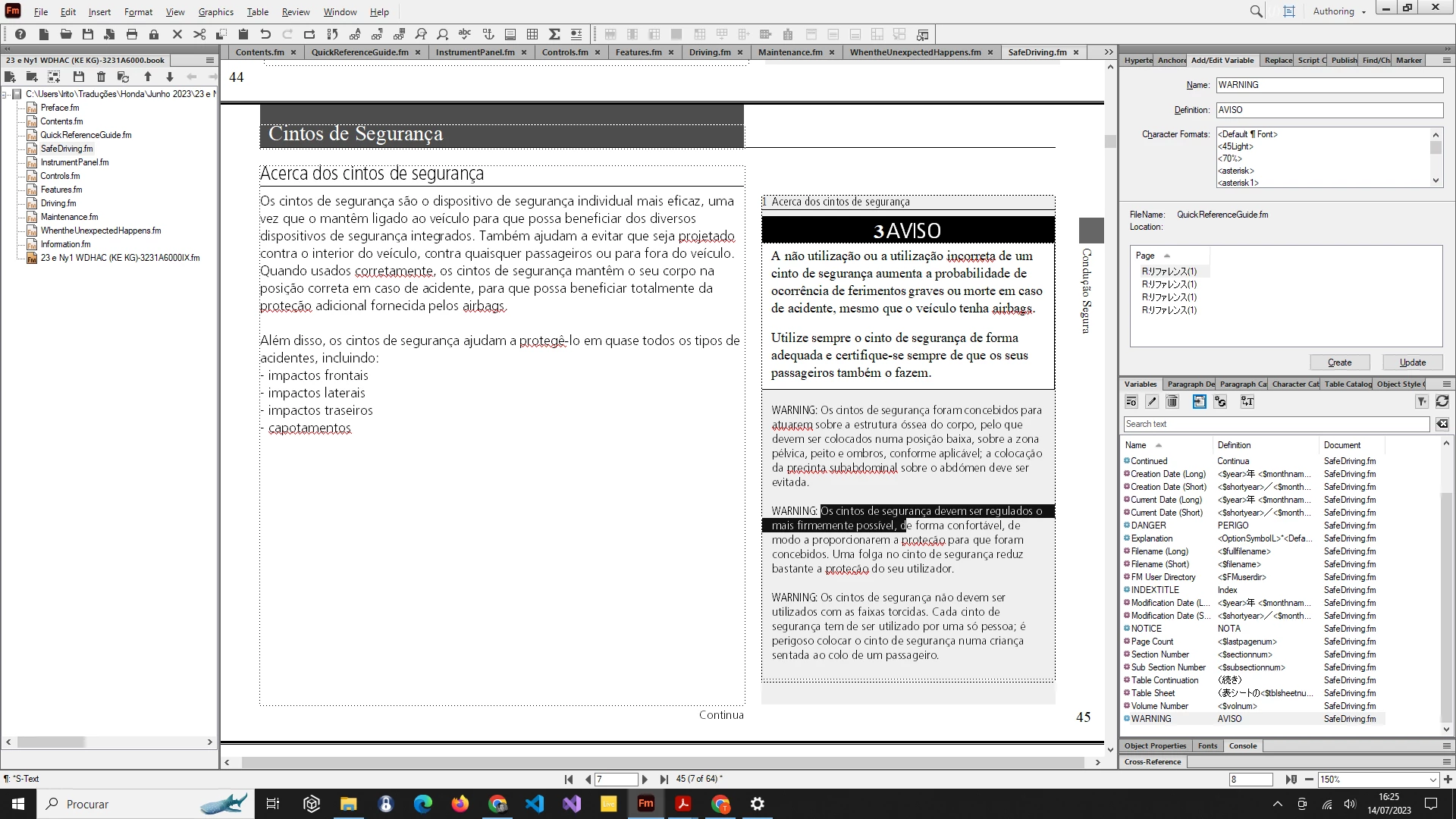
I am translating an owner's manual. In the right column of the following image, there is the word WARNING that is locked and I can't figure out how to unlock it. It is mixed with editable (unlocked) text. It seems this locking is programed. There is a variable named WARNING that corresponds to WARNING text frames with black background. Therefore, changing its definition doesn't change the locked text.
 

    This topic has been closed for replies.
    Correct answer FrameMaker-dk

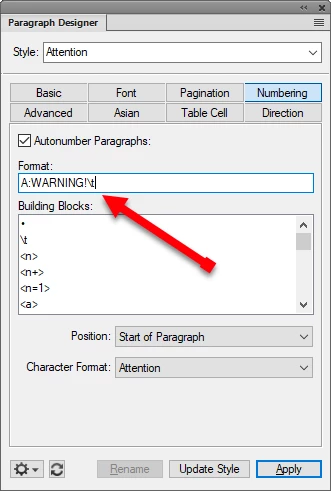
    Put your cursor in the paragraph with the warning text and open Paragraph Designer, Ctrl+M

    Go to the Numbering tab. It will probably look something like this:

    The Format box, is where you will find the text which needs to be translated. I think.... because @Bob_Niland is right - it can be accomplished in more ways than one.

    3 replies

    Barb Binder
    Community Expert
    Community Expert
    July 16, 2023

    Hi @luisf82167845:


    I'm convinced that Bob and Bjørn are correct so just here to add the why: Paragraph Designer > Numbering is used to define numbered lists, numbered heads and bullet lists. That could be enough, but an experienced FrameMaker user knows that you can add anything you like in the Autonumber format text box and so people often use it to add the words "Warning", "Note", "Important" etc., so that they can add the word in front of a paragraph by simply assigning a paragraph style and not have to type it each time. If they need to edit the word (like you do) they can change one occurrence and click on Update Style and FrameMaker will update all the others in that file. 


    FrameMaker documents are long by nature, so those of us who know FrameMaker well are all about streamlining our workflow. Shaving seconds can add up to weekends over the course of several revisions. 


    ~Barb

    ~Barb at Rocky Mountain Training
    FrameMaker-dkCommunity ExpertCorrect answer
    Community Expert
    July 14, 2023

    Put your cursor in the paragraph with the warning text and open Paragraph Designer, Ctrl+M

    Go to the Numbering tab. It will probably look something like this:

    The Format box, is where you will find the text which needs to be translated. I think.... because @Bob_Niland is right - it can be accomplished in more ways than one.

    Bjørn Smalbro - FrameMaker.dk
    luisf82167845
    Participant
    July 16, 2023

    Thank you very much for the help. Yes, in the format box it was placed "WARNING:" and I could translate it.

    Best regards.

    Bob_Niland
    Community Expert
    Community Expert
    July 14, 2023

    Chances are it's a prefix added via the /Numbering\ properties of the WARNING paragraph format.

    But being Framemaker, there are multiple ways to implement these safety signal words.