

Tobinator0806
Inspiring
April 6, 2022
Answered

How can I use a 'properties' file with DITA-OT output?

  • April 6, 2022
  • 2 replies
  • 443 views

Hello all!


Is there a way to specify a .properties file to use when processing DITA content with the DITA-OT? A .properties file can contain information about how to process the DITA data, such as including custom CSS files, headers and footers.


I thought it might be this last text box in the DITA-OT Customize dialog. (Sorry I'm working in a Japanese environment, but the last text box is "Additional parameters".
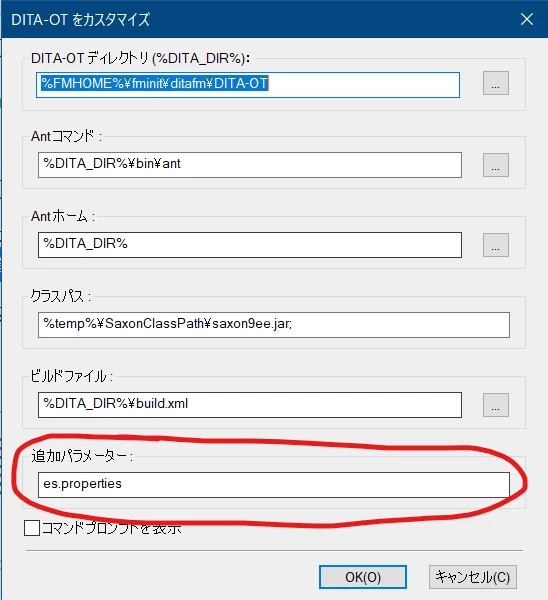
I tried entering "--propertyfile=es.properties" which is what I use on the command line with the standard 'dita' command. However, nothing is output.

I tried "es.properties", but then I get a build error:

BUILD FAILED
Target "es.properties" does not exist in the project "DOST".


Since I can't see what command FrameMaker is using, it's near impossible to diagnose the problem. (I can see a flicker of a command prompt, but it disappears before I can see what it's doing...) And the documentation is no help either ("You can specify additional parameters"... THANKS!)


Any insights would be appreciated.


Cheers!

Michael


    This topic has been closed for replies.
    Correct answer Tobinator0806

    Success!


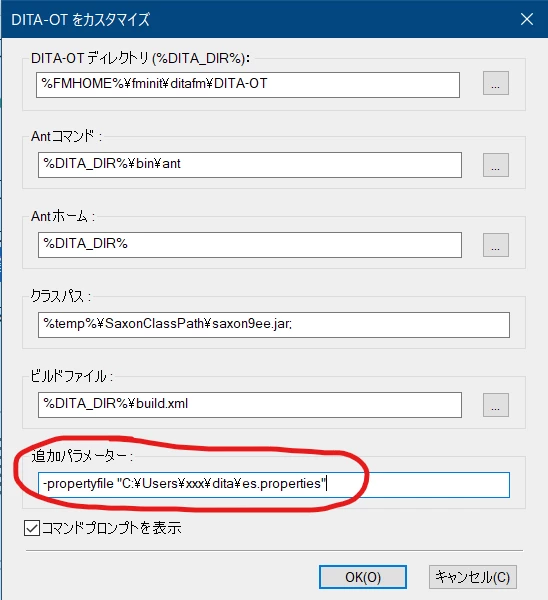
    It turns out you can pass a property file via the "-propertyfile <file>" command line argument:


    Just specifying '-propertyfile es.properties' didn't work; the program isn't looking in the directory where the DITA files are, so I had to specify an absolute path.


    By the way, creating a custom ant build file and defining the properties there worked too:


    <?xml version="1.0" encoding="UTF-8" ?>
    <project name="prj" default="bld" basedir=".">
    
      <!--dita.dir apparently supplied by FrameMaker 
        <property name="dita.dir" location="C:\Program Files\Adobe\Adobe FrameMaker 2020\fminit\ditafm\DITA-OT"/> 
      -->
    
      <target name="bld">
        <ant antfile="${dita.dir}/build.xml">
        <!-- args.input and transtype also supplied by FrameMaker -->
          <!-- <property name="args.input" value="C:\Users\xxx\dita\mydita.ditamap"/>
          <property name="transtype" value="html5"/> -->
    
          <property name="args.cssroot" value="C:\Users\xxx\dita"/>
          <property name="args.css" value="MyStyle.css"/>
          <property name="args.copycss" value="yes"/>
        </ant>
      </target>
    
    </project>


    Set the Build file field to point to this file worked.


    I hope this helps anyone else having the same problem!


    - Michael

    2 replies

    Tobinator0806
    Inspiring
    April 8, 2022

    After some experimentation, I've discovered that FM doesn't call the 'dita' command; it goes straight to 'ant'.

    Per Markus's suggestion, I tried setting several parameters (like 'nav-toc') with -Dnav-toc=partial, but with no results.


    I think my only option is to create an ant build file and specify the parameters there.


    I'm going to try the instructions at the DITA-OT documentation.

    Tobinator0806
    Tobinator0806AuthorCorrect answer
    Inspiring
    April 8, 2022

    Success!


    It turns out you can pass a property file via the "-propertyfile <file>" command line argument:


    Just specifying '-propertyfile es.properties' didn't work; the program isn't looking in the directory where the DITA files are, so I had to specify an absolute path.


    By the way, creating a custom ant build file and defining the properties there worked too:


    <?xml version="1.0" encoding="UTF-8" ?>
    <project name="prj" default="bld" basedir=".">
    
      <!--dita.dir apparently supplied by FrameMaker 
        <property name="dita.dir" location="C:\Program Files\Adobe\Adobe FrameMaker 2020\fminit\ditafm\DITA-OT"/> 
      -->
    
      <target name="bld">
        <ant antfile="${dita.dir}/build.xml">
        <!-- args.input and transtype also supplied by FrameMaker -->
          <!-- <property name="args.input" value="C:\Users\xxx\dita\mydita.ditamap"/>
          <property name="transtype" value="html5"/> -->
    
          <property name="args.cssroot" value="C:\Users\xxx\dita"/>
          <property name="args.css" value="MyStyle.css"/>
          <property name="args.copycss" value="yes"/>
        </ant>
      </target>
    
    </project>


    Set the Build file field to point to this file worked.


    I hope this helps anyone else having the same problem!


    - Michael

    Markus Wiedenmaier
    Inspiring
    April 7, 2022

    Michael,

    haven't used property files in FM yet. So I'm not sure if following has any positive affect:

    Try to use

    -Dpropertyfile=file


    So instead of 

    --propertyfile=es.properties

    try

    -Dpropertyfile=es.properties


    Markus

    Tobinator0806
    Inspiring
    April 7, 2022

    Markus,


    Thank you for your reply!

    Unfortunately it didn't work. The output was generated (so at least a step in the right direction!) but none of the arguments in the property file were reflected in the output 🤷‍♂


    Though it's good to know these parameters are passed to Ant and not dita, which will help to find the problem.


    Best,

    Michael