Answered
How can I use Roman Numerals format for page numbers
I have a specific section of a book that needs to be paged using Roman Numeric style. I can only figure out how to do regular numbers. Any help would be greatly appreciated  ! Using FM13

I have a specific section of a book that needs to be paged using Roman Numeric style. I can only figure out how to do regular numbers. Any help would be greatly appreciated ! Using FM13
I'm not familiar with the process of book level control of the page numbers.
My current project is to compile multiple instructions over three separate intervals. So in my head, I have a front matter with TOC, a page to show which instruction documents have changes, introduction material and definitions for how-to use the instructions, Then VOL 1 and its set of documents, VOL 2 and docs, and finally VOL 3 and its related material. What's the best way to parse out the TOC to represent the divisions? I might know, but I'd need to add more tags to the template... also I'm not to use page numbers per se because each instruction can be distributed to necessary roles. My TOC as of now, only displays, the Doc number, the title, and how many pages each doc is. I tried to use doc page counts to populate the TOC but I am unable to manipulate the order of information in the output TOC file. why?
Your class I was in a couple of years back was largest growth period learning FM... you are still my sensei!
Did you take the intro class with me, the advanced class, or both? Books, book numbering, TOC are all covered in the Advanced class, but of course, you have the book for both. Chapter 11 addresses this (and some of your other questions). That said:
I'm not familiar with the process of book level control of the page numbers.
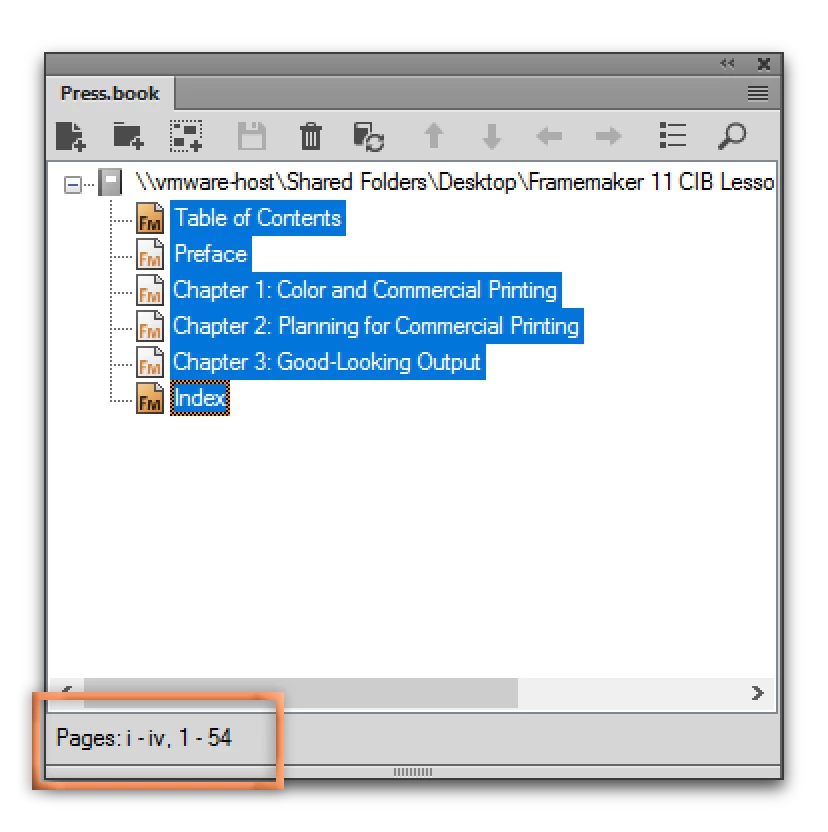
to address the question at hand, you can see the numbering for the entire book in the book window, and can update the numbering here as well. Select all the files, and look at the bottom left. When you want to update the numbering, just right click one or more files in the book window and choose Numbering > Page.
Already have an account? Login
Enter your E-mail address. We'll send you an e-mail with instructions to reset your password.


 AdChoices