Known Participant
July 25, 2023
Answered

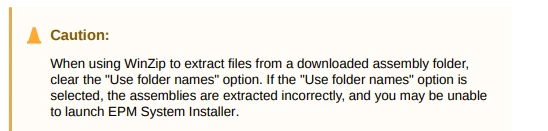
How Can we create Caution like this in Adobe Frame Maker

  • July 25, 2023
  • 3 replies
  • 1854 views

How Can we create Caution like this?


    This topic has been closed for replies.
    Correct answer FrameMaker-dk

    What you do is that you use the feature in Paragraph Designer which will let you add a graphic above the paragraph.
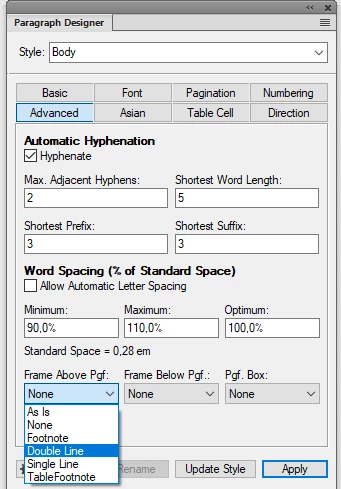
    1. Set your cursor in a warning text
    2. Go to Paragraph Designer
    3. Go to the tab "Advanced"
    4. Click in the dropdown box "Frame Above"
    5.  

    6. Here you find some standard graphics. What you need is to create a new graphic consisting of the triangle and the word Caution. Put this graphic on the reference page and give it a name. Now you can use that graphic as a Frame Above in the paragraph designer.

    3 replies

    Bob_Niland
    Community Expert
    Community Expert
    July 25, 2023

    Due to the two different colors in the format, the Frame Above approach is likely the most effective, esp. if it requires some custom SVG for the icon. Otherwise, an autonumber hack might suffice.


    Is that triangle intended to be a traffic cone, or a:
    ⚠ U+26A0 WARNING SIGN

    If a warning sign (alert symbol), do check with the liability carrier for your organization, regarding conforming use of it (and the signal word CAUTION), as these are typically only used where there is risk of personal injury, and not merely unexpected results. The ANSI spec, for example, discourages the use of the ⚠ with caution, even where caution is appropriate. NOTICE might be preferred.


    Unicode currently appears to lack a character for traffic cones. There are some other triangular forms you could use, with the nearest cone mimic being:

    ⧍ U+29CD TRIANGLE WITH SERIFS AT BOTTOM


    Other triangular forms include (and not all may render correctly in the forum):
    Δ U+0394 GREEK CAPITAL LETTER DELTA
    ᐎ U+140E CANADIAN SYLLABICS WI
    ᐏ U+140F CANADIAN SYLLABICS WEST-CREE WI
    ᐃ U+1403 CANADIAN SYLLABICS I
    ᐬ U+142C CANADIAN SYLLABICS IN
    ∆ U+2206 INCREMENT
    ⍙ U+2359 APL FUNCTIONAL SYMBOL DELTA UNDERBAR
    ⵠ U+2D60 TIFINAGH LETTER YAV
    ▲ U+25B2 BLACK UP-POINTING TRIANGLE
    △ U+25B3 WHITE UP-POINTING TRIANGLE
    ◬ U+25EC WHITE UP-POINTING TRIANGLE WITH DOT
    ◭ U+25ED UP-POINTING TRIANGLE WITH LEFT HALF BLACK
    ◮ U+25EE UP-POINTING TRIANGLE WITH RIGHT HALF BLACK
    ⟁ U+27C1 WHITE TRIANGLE CONTAINING SMALL WHITE TRIANGLE
    ⧊ U+29CA TRIANGLE WITH DOT ABOVE
    ⧋ U+29CB TRIANGLE WITH UNDERBAR
    ⧌ U+29CC S IN TRIANGLE
    ⨹ U+2A39 PLUS SIGN IN TRIANGLE
    ⨺ U+2A3A MINUS SIGN IN TRIANGLE
    ⨻ U+2A3B MULTIPLICATION SIGN IN TRIANGLE


    If you need to have other content inside the triangle, (? here), this might work, might not:
    ?⃤ U+20E4 COMBINING ENCLOSING UPWARD POINTING TRIANGLE


    These won’t work in FM8…FM2022, due to being above BMP (>U+FFFF):
    𐊅 U+10285 LYCIAN LETTER D
    𐊣 U+102A3 CARIAN LETTER L
    𖼚 U+16F1A MIAO LETTER TLHA
    𝝙 U+1D759 MATHEMATICAL SANS-SERIF BOLD CAPITAL DELTA
    🔺 U+1F53A UP-POINTING RED TRIANGLE
    🔼 U+1F53C UP-POINTING SMALL RED TRIANGLE
    🛆 U+1F6C6 TRIANGLE WITH ROUNDED CORNERS
    🜂 U+1F702 ALCHEMICAL SYMBOL FOR FIRE
    🟕 U+1F7D5 CIRCLED TRIANGLE
    🟖 U+1F7D6 NEGATIVE CIRCLED TRIANGLE

    Barb Binder
    Community Expert
    Community Expert
    July 25, 2023

    Hi Amit:


    This is touched on in this post, and explained more fully in the linked post on More on Reference Pages. 

    https://www.rockymountaintraining.com/adobe-framemaker-assign-a-caution-label-to-a-paragraph-tag/


    ~Barb

    ~Barb at Rocky Mountain Training
    Known Participant
    July 25, 2023

    Thank You Barb! I'll check. 

    FrameMaker-dkCommunity ExpertCorrect answer
    Community Expert
    July 25, 2023

    What you do is that you use the feature in Paragraph Designer which will let you add a graphic above the paragraph.

    1. Set your cursor in a warning text
    2. Go to Paragraph Designer
    3. Go to the tab "Advanced"
    4. Click in the dropdown box "Frame Above"
    5.  

    6. Here you find some standard graphics. What you need is to create a new graphic consisting of the triangle and the word Caution. Put this graphic on the reference page and give it a name. Now you can use that graphic as a Frame Above in the paragraph designer.
    Bjørn Smalbro - FrameMaker.dk
    Known Participant
    July 26, 2023

    I understood the steps up to 5. But in step 6, how can I create a new graphic consisting of the triangle and the word Caution. Pls eloborate.