
Known Participant
March 13, 2025
Question

How can we highlight code syntax in Frame Maker?

  • March 13, 2025
  • 3 replies
  • 315 views

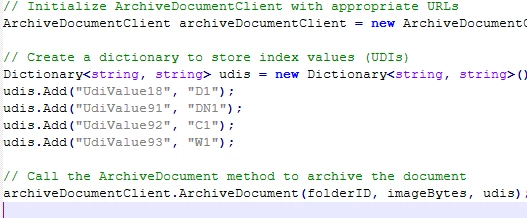
Does FrameMaker support code syntax highlighting? I am copying the code into FrameMaker, but it is being pasted as plain text. Is there a way to highlight the code syntax with different colors? I am trying to copy the code exactly as shown below:


    3 replies

    Bob_Niland
    Community Expert
    Community Expert
    March 13, 2025

    What code editor application is presenting that colorized code view?

    Can it export to PDF*, preserving that text decoration?
    If so, a quick solution is to do that, and import the PDF(s). This would preserve it as selectable text in the FM output to print or PDF (but not to XML or HTML), whereas doing it with screenshots would have it be raster pixels in all workflows.


    *Can it export to HTML, preserving the markup?

    Community Expert
    March 13, 2025

    You could definitely create a series of Find/Replace steps with regular expressions to apply character formats to different keywords.

    There are some batch find/replace add-ons. E.g.:

    FindReplace from Klaus Göbel

    https://4xscripts.com/en/scripts

    FindChangeBatch from Rick Quatro.

    I do not know, if they can also replace with a character format.

    frameexpert
    Community Expert
    Community Expert
    March 13, 2025

    My FindChangeBatch script does not apply character formatting, but it could be modified to do so. If you are interested, please contact me offlist. Thank you.

    Jeff_Coatsworth
    Community Expert
    Community Expert
    March 13, 2025

    Not that I know of - you should create your own code_green, code_blue, code_bluebold paragraph tags to apply to the text OR just bring it in as an image.