Known Participant
January 26, 2024
Answered

How can we increase the size of the "Chapter "?

  • January 26, 2024
  • 2 replies
  • 314 views

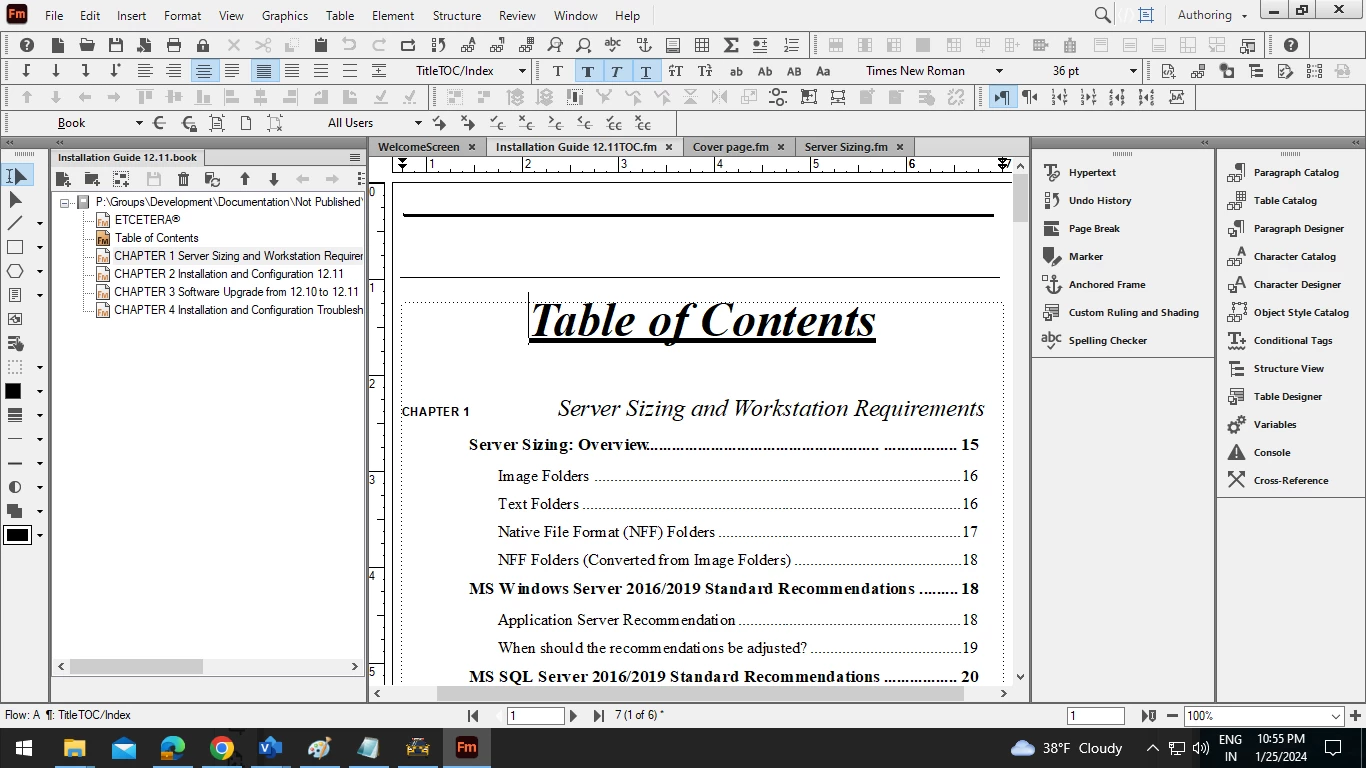
Hi, please someone hints how can I increse the size of the word "Chapter" (please refer the image below). I am using standard template (Book > Chapter).



    This topic has been closed for replies.
    Correct answer Matt-Tech Comm Tools

    Your question highlighted something that's a bit confusing about formatting in TOCs, so I put together a 4-minute video on how to manage this. This should exactly fix your sizing issue.

    https://youtu.be/d-AT2vRrl_U

    I also added the video to my online template design course 😉

    -Matt

    2 replies

    Matt-Tech Comm Tools
    Community Expert
    Matt-Tech Comm ToolsCommunity ExpertCorrect answer
    Community Expert
    January 26, 2024

    Your question highlighted something that's a bit confusing about formatting in TOCs, so I put together a 4-minute video on how to manage this. This should exactly fix your sizing issue.

    https://youtu.be/d-AT2vRrl_U

    I also added the video to my online template design course 😉

    -Matt

    -Matt Sullivan, FrameMaker Course Creator, Author, Trainer, Consultant
    Known Participant
    January 27, 2024

     It worked. Thank you veru much! 

    Community Expert
    January 26, 2024

    The word "Chapter" has a character tag applied, I believe. If you put your cursor in the paragraph with the word "Chapter" and go to the numbering tab in Paragraph Designer, you may find that there has been applied a character tag to the numbering. So, what you need to do, is to change the font size in that character tag.

    Bjørn Smalbro - FrameMaker.dk
