Community Expert
September 29, 2021
Answered

How do I add the top level structure name?

  • September 29, 2021
  • 1 reply
  • 575 views

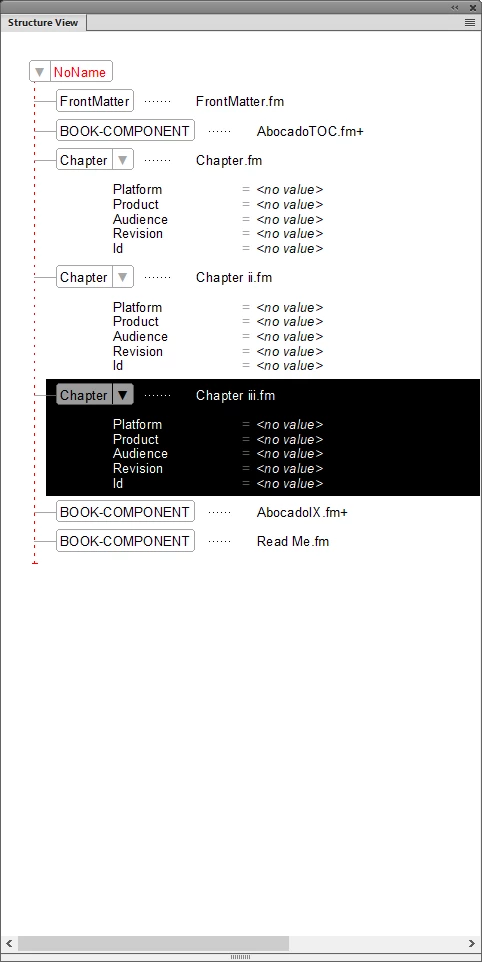
I am taking my first steps into working with structured documents. Right now I am working with the structured "Book" which comes with FrameMaker. I am uncertain however, as to how I add/change the top level "NoName" and make the entire book structure valid?

Can anybody point me in the right direction?...
    This topic has been closed for replies.
    Correct answer Matt-Tech Comm Tools


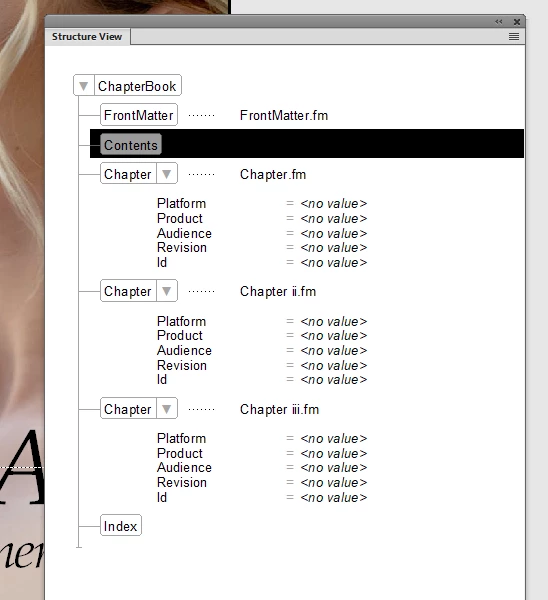
    Thank you Matt! Yes - with a little nudging around - that made the structure valid. And took away my toc and index, which were not structured.

    I suppose there is a way to rebuild the the toc and index correctly? I tried adding them again to the book in the traditional way,  but that will break the structure... 


    Try wrapping the Book Component elements in their respective TOC and IX elements. They are unstructured documents and thus are handled differently.

    1 reply

    frameexpert
    Community Expert
    Community Expert
    September 29, 2021

    Choose View > Panels (or Pods) > Element Catalog, select the NoName element in the structure and use the Element Catalog to change it to Book.

    Community Expert
    September 29, 2021

    Thank you for your answer. It seem I do not have that option though.


    Bjørn Smalbro - FrameMaker.dk
    Matt-Tech Comm Tools
    Community Expert
    Community Expert
    September 29, 2021

    Hi Bjorn, it looks like ChapterBook might be your "Valid at Highest Level" element.

    To check, open your Chapter.fm file and select Structure > EDD > Export Element Catalog as EDD. Look for the element with a General Rule that looks something like FrontMatter, TOC, Chapter, Chapter+, IX?. I'm guessing it will be the ChapterBook element.


    If so, select the NoName element, and use the Element Catalog to change to a ChapterBook element.


    -Matt

    -Matt Sullivan, FrameMaker Course Creator, Author, Trainer, Consultant