
Participating Frequently
August 13, 2022
Question

How do I change chapter numbering

  • August 13, 2022
  • 2 replies
  • 764 views

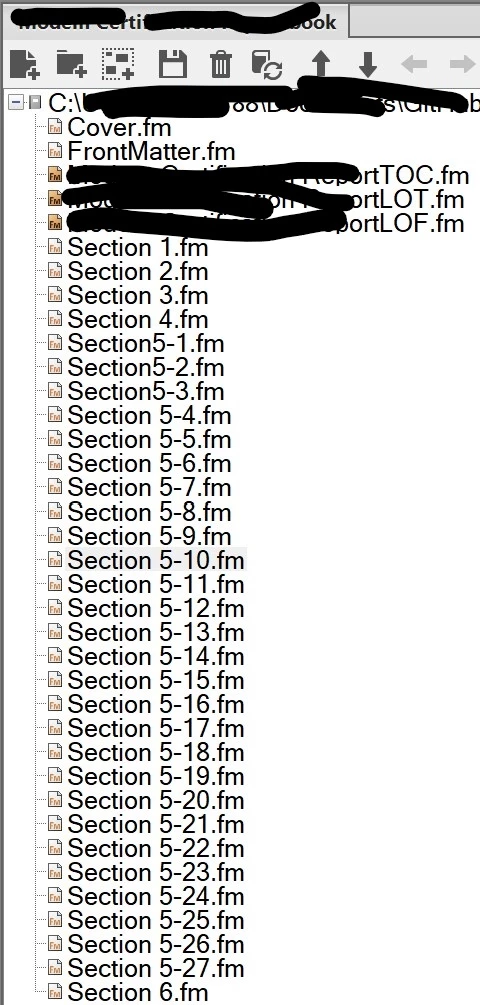
In FrameMaker V16.0.4, working on an inherited Bk file from prior writer of 2019. The chapter numbering is suddenly off and I'd like to understand how to Restart or renumber the files so that the Bk chapters, when opened, reflect the chapter number/order. Somehow they are all out of order as follows:

Chapter is Titled:       But inside the actual chapter headings, when you open it:

5.1                                       5.1

5.2                                       5.1

5.3                                       5.2

5.4                                       5.3

5.5                                       5.5

5.6                                       5.4

5.7                                       5.5

5.8                                       5.6

5.9                                       5.7

5.10                                     5.8

5.11                                     5.9

…..

5.19                                     5.15

5.20                                     5.16 and so on


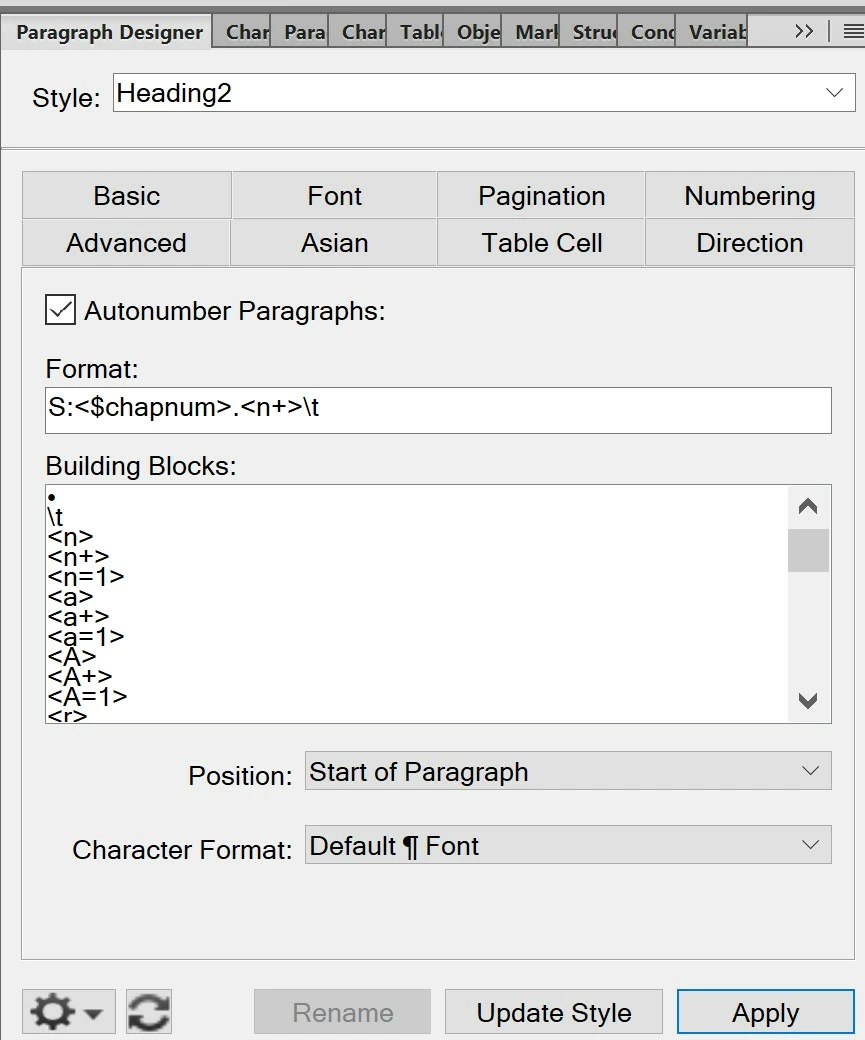
The settings are as follows, does this look like the area I should be trying to fix?
    This topic has been closed for replies.

    2 replies

    Dave Creamer of IDEAS
    Community Expert
    Community Expert
    August 13, 2022

    Usually this is done in the Book file. You can right-click on the document(s) to set the numbering and pagination. I've attached a PDF with some of your numbering options. Let me know if you have any questions. 


    David Creamer: Community Expert (ACI and ACE 1995-2023)
    PammerTAuthor
    Participating Frequently
    August 15, 2022

    Thanks for the helpful pdf containing tips. One has to understand how the Bk was originally built, and that's where I am unsure.  In FrameMaker V16.0.4.
    The Bk file contains four sections preceding the a series of sections 5-1 to 5-27. The prior writer set up those 4 initial sections and the letter "S" is employed in the FM Numbering setup window. None of the ideas offered in the helpful pdf you provided address a book that starts with four sections numbered consecutively, and then sections 5-1 through 5-27, with a final Section 6 (which is an Acronym list). It's those sections 5-1 through 5-27 that go out of order. Each attempt to gen or re-gen, the Bk picks up a Numbering error. Also it says it can't open some files to generate the .Bk because the file(s) contain missing fonts. When I click the option to Reformat using available fonts, why doesn't that election "stick?" Why would it keep prompting for fonts that are already accepted from the last Save? I'm definitely interested enrolling in FM training. But I am on a deadline as many of us are and must resolve the Numbering issue to help generate a book without errors.


    The uncorrupted, original book has the first five sections w Numbering settings S:<$chapnum>.

    Section 1 contains subsections 1.1, 1.2, through 1.5

    Section 2 contains subsections 2.1, 2.2, etc.

    Section 3 contains subsections 3.1, 3.2, etc.

    Section 4 contains subsections 4.1, 4.2, etc.

    Section 5-1 contains subsection 5.1, 5.2, etc.

    But Section 5-2 then has different Numbering settings: S:<$chapnum>.<n+>\t

    And Sections 5-3 through 5-27 also show S:<$chapnum>.<n+>\t

    For the Headings that are at level 3 (3Headings), it's S:<$chapnum>.<n>.<n+>\t

    I just do not understand how this keeps getting scrambled or "undone" when I attempt to regen after editing content. Something is renumbering the sections so that when I open Section 5.4, the headings inside of Section 5.4 say 5.3, or when opening Section 5-10, the headings say 5-8. All of the errant numbering as listed earlier in my post of Aug 13.

    Dave Creamer of IDEAS
    Community Expert
    Community Expert
    August 16, 2022

    >>>When I click the option to Reformat using available fonts, why doesn't that election "stick?" Why would it keep prompting for fonts that are already accepted from the last Save? 


    Turn off "Remember Missing Font Names" in the preferences before you open the file(s) to force the font change to be permanent. 

    David Creamer: Community Expert (ACI and ACE 1995-2023)
    Dave Creamer of IDEAS
    Community Expert
    Community Expert
    August 13, 2022

    You posted to a 12-year-old discussion. In the future, start a new discussion for better responses. 

    I moved your post.

    David Creamer: Community Expert (ACI and ACE 1995-2023)
    PammerTAuthor
    Participating Frequently
    August 13, 2022

    Thank you David.