
Participant
March 5, 2010
Answered

How do I change chapter numbering? Please help!!

  • March 5, 2010
  • 1 reply
  • 2850 views

Hi there.

Sorry to bother you with this (seemingly simple) question, but I've tried everything and still can't find the solution.

I recently inherited a document and am setting up the files.

It's mostly finished, I just need to clean it, PDF, and forward along.

...except for ONE problem:

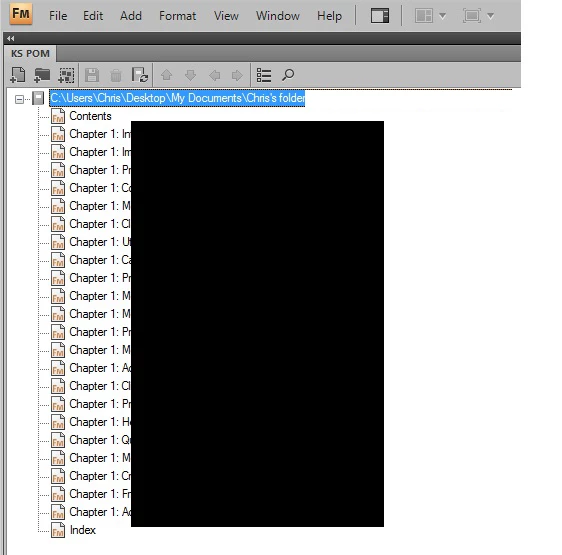
All the chapters say "Chapter 1"

I have tried Format > Document > Numbering, have looked online, and have tried every other method I can think of.

Every time I update the book, all the files still say "Chapter 1".

Please help!

Any advice would be greatly appreciated.

Thanks very much.
~Chris

ps. Please see attached JPEG for reference (I blacked out proprietary info) -thanks again!
    Correct answer Art Campbell

    OK,

    In each chapter file, in Paragraph Designer for the tag that defines the chapter number... what is the string in the Autonumber field?

    It should be something similar to

        H:Chapter <$chapnum>

    If not, modify it so that the <$chapnum> variable is used in the string.

    Do one or two chapters first, save the files, then update the book to see if it renumbered.

    Also... I'm assuming the numbers are incorrect in your TOC and other generated files, too, not just in the book file listing.

    Is that correct?

    1 reply

    Inspiring
    March 5, 2010

    In the book file, highlight all the chapters except the real chapter 1.

    Right-click > Numbering > Chapters > Increment from previous file. Apply, SAVE THE BOOK FILE, and update.

    Assuming that your Chapter tags are set up properly with the <$chapnum> variable, that should do it.

    cgincaAuthor
    Participant
    March 5, 2010

    Hi Art.

    Thanks very much for replying.

    Unfortunately, that didn't work either.

    There is no "Increment from previous file" option.

    (Fwiw, I didn't mention earlier that I am using FM 9.0. Does this matter?)

    Per your advice, I highlighted all chapters except #1, right-clicked, selected Numbering.

    From the Numbering Properties screen, "Continue Numbering From Previous Chapter in Book" is selected.

    (Please see screen capture below.)

    Saved, updated book, yet they still all say Chapter 1. 

    Help!

    Thanks again for any additional input!

    Art CampbellCorrect answer
    Inspiring
    March 5, 2010

    OK,

    In each chapter file, in Paragraph Designer for the tag that defines the chapter number... what is the string in the Autonumber field?

    It should be something similar to

        H:Chapter <$chapnum>

    If not, modify it so that the <$chapnum> variable is used in the string.

    Do one or two chapters first, save the files, then update the book to see if it renumbered.

    Also... I'm assuming the numbers are incorrect in your TOC and other generated files, too, not just in the book file listing.

    Is that correct?