MicGyver
Participant
September 25, 2024
Answered

How do I change the format of figure and table numbers?

  • September 25, 2024
  • 1 reply
  • 493 views

Whenever I insert an image, the figure number in the caption includes the chapter number and a sequential number, but they are separated by an en dash instead of a hyphen.  How do I change this so it has a hyphen instead of an en dash?

    This topic has been closed for replies.
    Correct answer FrameMaker-dk

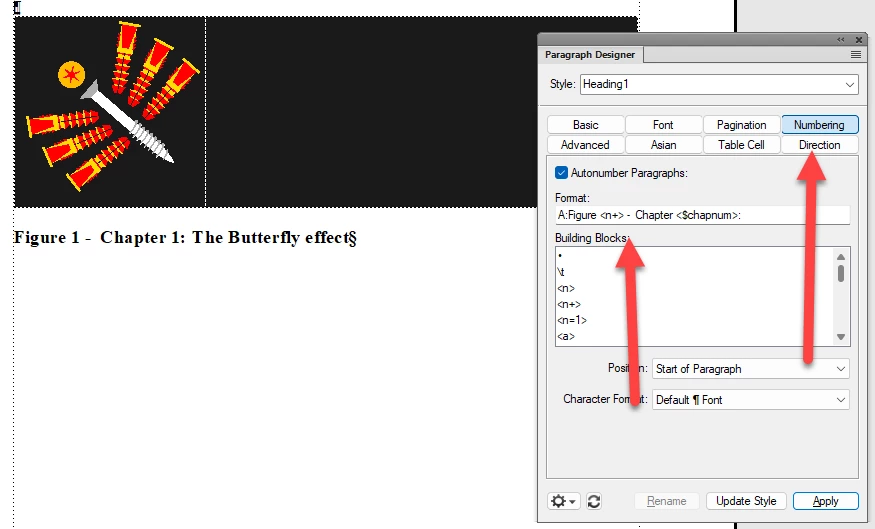
    IF I understand you correctly, you want to change a numbered paragraph. I you put your cursor in the caption text and go Paragraph Designer. Ctrl+M.

    In this palette you may have these settings or something resembling them. Changing the dash in the Format box and clicking Apply and update Style should do the trick.


    1 reply

    FrameMaker-dkCommunity ExpertCorrect answer
    Community Expert
    September 25, 2024

    IF I understand you correctly, you want to change a numbered paragraph. I you put your cursor in the caption text and go Paragraph Designer. Ctrl+M.

    In this palette you may have these settings or something resembling them. Changing the dash in the Format box and clicking Apply and update Style should do the trick.


    Bjørn Smalbro - FrameMaker.dk
    MicGyver
    MicGyverAuthor
    Participant
    September 25, 2024

    Oh good heavens, how did I not think of that??  It's so obvious...  Guess I'll be wearing the DUNCE cap for the rest of the day!

    Thank you so much!

    frameexpert
    Community Expert
    Community Expert
    September 25, 2024

    Even MacGyver struggles with FrameMaker occasionally.