Inspiring
August 6, 2016
Answered

How do I dock the Quick Access Bar in FM 2015?

  • August 6, 2016
  • 2 replies
  • 469 views

The whole question is in the title.

Thanks in advance for any guidance.

Jack

    This topic has been closed for replies.
    Correct answer Barb Binder

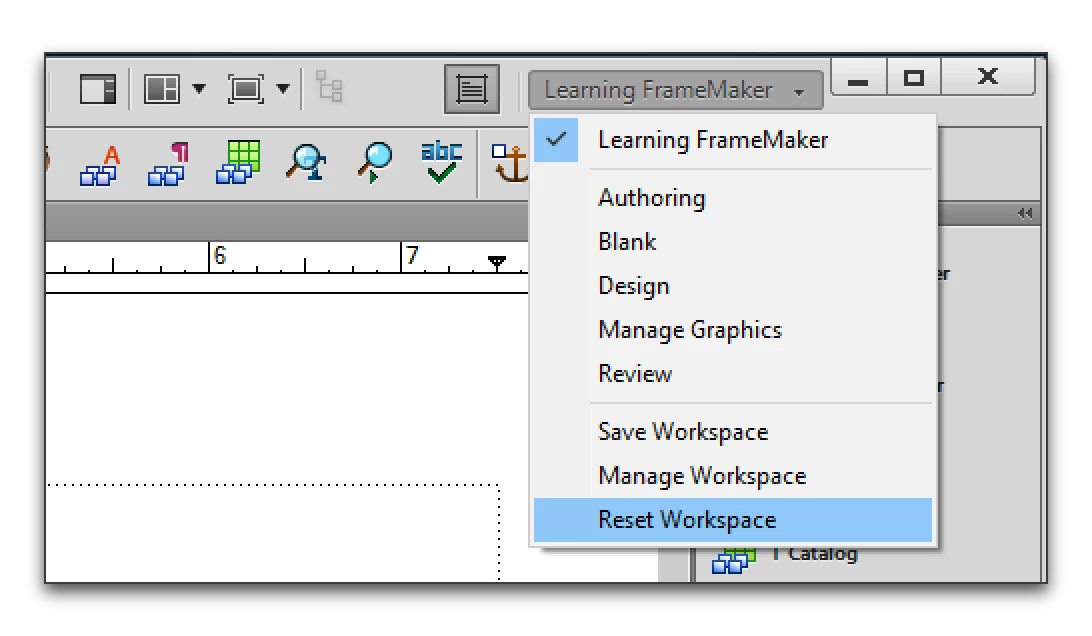
    You can simply reset your workspace or drag the gray bar front of the question mark icon up above the Tab bar—don't let go until you see a blue horizontal bar.

    Reset Workspace:

    Manually dock the Quick Access bar:

    2 replies

    Inspiring
    August 7, 2016

    I'll be go to hell. I could swear that little bar next to the question mark was gone. But now it's there and I can dock no problem. This reminds me of cars - sometimes all you have to do is threaten a car with a mechanic and suddenly it starts working right. Sigh.

    Thanks for your help, Barb!

    Jack

    Barb Binder
    Community Expert
    Community Expert
    August 7, 2016

    LOL! Glad it's back, and that you are back on track.

    ~Barb at Rocky Mountain Training
    Barb Binder
    Community Expert
    Barb BinderCommunity ExpertCorrect answer
    Community Expert
    August 6, 2016

    You can simply reset your workspace or drag the gray bar front of the question mark icon up above the Tab bar—don't let go until you see a blue horizontal bar.

    Reset Workspace:

    Manually dock the Quick Access bar:

    ~Barb at Rocky Mountain Training