karend63723674
Participant
June 1, 2017
Answered

How do I enable FM to read my page numbers correctly in the TOC?

  • June 1, 2017
  • 4 replies
  • 389 views

I have the page numbers set as I want them in each file of the book. The files are:

1. cover

2. TOC roman

3. LOT roman

4. content numeric

The LOT reads the page numbers correctly however the TOC does not, it is not clear what it is doing as it starts listing with 1 as wanted but the remaining page numbers continue to be wrong ending up with being off by 5 pages at the end of a 44 page document.

I have been all over the forum and went through everything I could find and I can't seem to fix it. Can someone please offer some guidance?

Thanks!

    This topic has been closed for replies.
    Correct answer Barb Binder

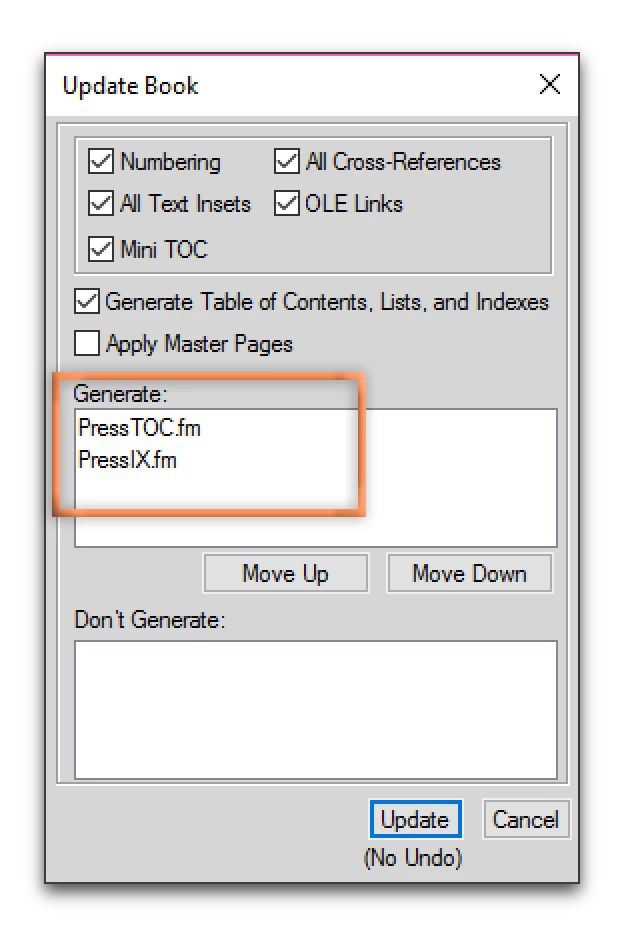
    Hmmm. Is the TOC getting updated when you update your book? Are both the TOC and the LOT listed in the Generate list in the Update Book dialog box? If that isn't the issue, could you share a screen shot of your book window with all the files selected, all the way down to the bottom row (which shows the page numbers), along with the first page of the TOC and the first page of the LOT?

    4 replies

    Legend
    June 2, 2017

    Round the edges of this, here's the sort of thing I'd expect to see in the book panel. This is the best place to start when you want changes in numbering and number format.

    My apologies for the screen captures, which have decided to replace a very visible blue highlight under im_xenteoLOF.fm and im_xeo_about.fm with an almost invisible grey.

    Barb Binder
    Community Expert
    Barb BinderCommunity ExpertCorrect answer
    Community Expert
    June 2, 2017

    Hmmm. Is the TOC getting updated when you update your book? Are both the TOC and the LOT listed in the Generate list in the Update Book dialog box? If that isn't the issue, could you share a screen shot of your book window with all the files selected, all the way down to the bottom row (which shows the page numbers), along with the first page of the TOC and the first page of the LOT?

    ~Barb at Rocky Mountain Training
    karend63723674
    Participant
    June 2, 2017

    Thank you Barb, It was not updating since it was not in the list for updating book. I deleted the TOC and recreated and problem solved. I should have noticed this. This is still a new program to me that I don't get to use very often. I figured it was something simple I was missing, many thanks!

    Barb Binder
    Community Expert
    Community Expert
    June 2, 2017

    Always happy to help, Karen.

    If you have questions down the road, don't hesitate to come back and ask us.

    ~Barb at Rocky Mountain Training