Inspiring
Oct 28, 2016 5:25 PM UTC
Answered

How do I fix line wrapping in the TOC?

Hello all,

Notice how the second line is justified all the way to the left.  Can I align this somehow so that is it justified with the previous line?

Many thanks

Regards,

Ben

    This topic is closed to new replies. Start a new post to keep the conversation going.
    jaggedpeak
    jaggedpeakCorrect answer
    Inspiring
    Oct 28, 2016 6:11 PM UTC

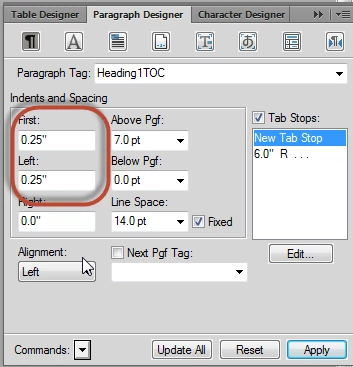
    In the Paragraph Designer, update the appropriate TOC paragraph style so that the 'First' and 'Left' values are the same.

    e.g.

    3 replies

    Jeff_Coatsworth
    Community Expert
    Community Expert
    Oct 28, 2016 6:14 PM UTC

    You could also try the trick Arnis describes in post#14 of this thread - Re: I can't get the page numbers in my table of contents to update when I update the book.

    Translate
    Jeff_Coatsworth
    Community Expert
    Community Expert
    Oct 28, 2016 6:16 PM UTC

    There's also this discussion too - Re: Chapter Title breaking/splitting up in the TOC

    Translate
    jaggedpeak
    jaggedpeakCorrect answer
    Inspiring
    Oct 28, 2016 6:11 PM UTC

    In the Paragraph Designer, update the appropriate TOC paragraph style so that the 'First' and 'Left' values are the same.

    e.g.

    Translate