


Brad Shannon
Participating Frequently
June 1, 2015
Answered

How do I format a header in a master page?

  • June 1, 2015
  • 2 replies
  • 476 views

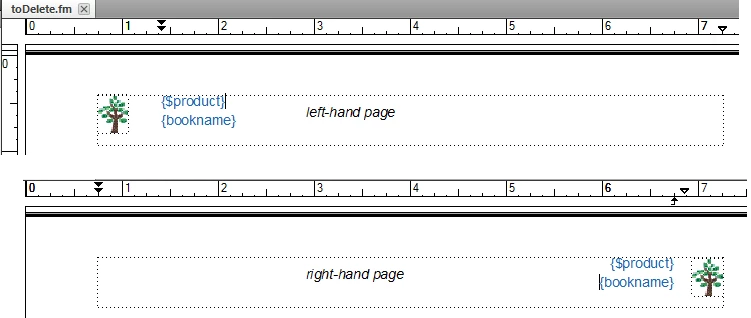
In a doc I inherited, they have a small graphic/icon in the upper right or left of the page, as part of the header.

The running header is fine sometimes, but other times it overlaps with the icon.

I'd like to narrow the running header so it does not overlap with the grahic icon, but I have had trouble figuring out how to do that.
    This topic has been closed for replies.
    Correct answer FieryPantone

    speculative without seeing the exact problem, but perhaps use a right tab to position the running-header variable on right-hand pages? and a left indent on left-hand pages

    runaround on the icon might be another approach, but I feel safer with spacing-attributes I can see :-}

    2 replies

    Arnis Gubins
    Inspiring
    June 1, 2015

    Depending upon your layout (if it's similar to what is shown in the previous post), all you might have to do is to make the text frame for the headers smaller, i.e. so that the icon graphic is outside of the text boxes.

    Legend
    June 2, 2015

    make the text frame for the headers smaller …

    Now why on earth have I never thought of that?

    FieryPantoneCorrect answer
    Legend
    June 1, 2015

    speculative without seeing the exact problem, but perhaps use a right tab to position the running-header variable on right-hand pages? and a left indent on left-hand pages

    runaround on the icon might be another approach, but I feel safer with spacing-attributes I can see :-}

    Brad Shannon
    Participating Frequently
    June 2, 2015

    Thanks, yes, will try that (actually, both suggestions).

    I was trying to shrink the text frame smaller, but not having much luck.