



Community Expert
March 12, 2026
Question

How do I format a list of Authors?

  • March 12, 2026
  • 3 replies
  • 106 views

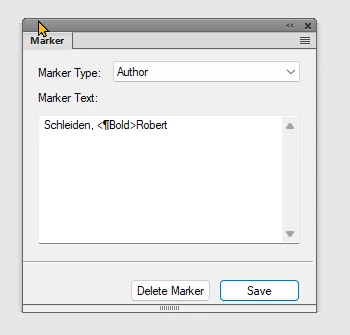
I am generating a List of Authors and I want the First or Second Name to be bold. But I can’t make it work properly. This is the Marker dialogue and I have tried adding code for a character style called “Bold”. And also, this isn not working. I believe I CAN make it work, but I can’t remember how?

Any suggestions?  
 

    3 replies

    Barb Binder
    Community Expert
    Community Expert
    March 12, 2026

    Honestly, this just makes me laugh:

    • First column: original content has a bold char style, assigned to the first names in the Marker box (no pilcrow).
    • Second column: shows why Bjørn needs Rick’s regular expressions because Fm just adds the character style name in an  List of Markers (Alphabetical) (ALM). (This happens in all lists, not just alphabetical lists.)
    • Third column: shows that the Index of Authors (AIX) totally understands the character style and works exactly like Bjørn thought it would. (All index variations, not just Author index.)

    Questions like this remind me why FrameMaker experts are still so valuable, and not likely to be replaced by AI anytime soon because AI simply doesn’t get FrameMaker nuances. And this is anything but intuitive. LOL

         Bjørn: if you can live with the auto Group Titles, run an Index of Markers (Alphabetical) to skip the Regular Expressions that will need to be run after each book update if you use a List.

    ~Barb at Rocky Mountain Training
    Community Expert
    March 12, 2026

    Brilliant ​@Barb Yes this works! I toyed around with trying to limit the formatting to the last name, rather than the first, making it <Bold>Smalbro</Bold>Bjørn, but that did not work, for som reason. I believe this fomatting style works in cross reference and header formatting, though? I have a lot to learn regarding the use of markers, I believe :-) 
    This is for a template, and while ​@frameexpert solution is fine and doable, I can’t really build it into a template. 

    Bjørn Smalbro - FrameMaker.dk
    Barb Binder
    Community Expert
    Community Expert
    March 12, 2026

    Rick’s REGEX is an excellent approach to your original question but yes, it’s more of a production technique than one for a template that you are making available to others. 

         I came up with one more idea but honestly, it’s not good for a template either: I can’t seem to get rid of the Group Titles (A group, B group, C group). Even after removing the paragraphs from the reference pages, they just return with the book update. My last idea was to make them tiny and white so that they disappear and look like a LOM, but in a template environment, that would be so confusing for anyone moving around the template and finding them unexpectedly.

         Oh, and for last name only use <Bold>Smalbro<Default Para Font>, Bjørn. Character styles in a marker or in a cross-reference definition turn themselves off at the end of the paragraph, but if you need them to turn off in the middle, you have to manually add the <Default Para Font> building block.


    Someone smarter than me can weigh in on including the comma in the bold, or not. I couldn't decide. 😂

    ~Barb at Rocky Mountain Training
    frameexpert
    Community Expert
    Community Expert
    March 12, 2026

    When you do a List of Markers, character formats don’t work. They only work in Marker Indexes.

    One way you could do this would be to add some kind of tagging in the entry and then have a script post-process the list. For example,

    Schleiden, <b>Robert</b>

    or

    Schleiden, {{Robert}}

    www.frameexpert.com
    Community Expert
    March 12, 2026

    Damn! Thanks for the answer and work around solution!

    Bjørn Smalbro - FrameMaker.dk
    frameexpert
    Community Expert
    Community Expert
    March 12, 2026

    If you use double curly braces, you can use this to apply your character format after you copy it to the clipboard.

    Then you can use this to get rid of the curly braces:

    (Actually, you can use the second Find string in both steps.)

    Curly braces are special characters in Regular Expression syntax and that’s why you have to escape them with a backslash.

    www.frameexpert.com
    Jeff_Coatsworth
    Community Expert
    Community Expert
    March 12, 2026

    Isn’t it just “<Bold>” instead of the pilcrow in there?