
Known Participant
July 25, 2012
解決済み

How do I get a symbol inserted in a sentence to not overlap top sentence?

  • July 25, 2012
  • 返信数 2.
  • 1721 ビュー

Hello all!

Here is a picture of my problem, which shows the inserted symbol mid-sentence overlapping my top sentence text:
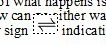
How do I fix this? THANK YOU so much in advance!

jessie

P.S. The symbol automatically flowed in when I imported my stuff from Word, so I did not insert this in FM. I'm in FM 10 with 32-bit OS.

    このトピックへの返信は締め切られました。
    解決に役立った回答

    Select the paragraph where the figure appears.

    Open Paragraph Designer.

    On the Basic tab, in the Indents and Spacing frame, deselect the "Fixed" check box.

    Apply the change.

    This increases the leading for the line.  The other option is to resize the figure and its containing frame to fit the standard leading.

    返信数 2

    Bob_Niland
    Community Expert
    Community Expert
    July 26, 2012

    If you have a Unicode font with code point 21CC populated, you can avoid the graphic framing altogether by just typing the harpoons as a character.

    Jessie2020作成者
    Known Participant
    July 26, 2012

    Thanks AJ and Error! I ended up unchecking the fixed box and that worked great. Thanks for making my day easier! Have a good one.

    Bob_Niland
    Community Expert
    Community Expert
    July 26, 2012

    Windows font MS Arial Unicode has the glyph for code point U+21CC.

    I'd insert it as a character, rather than an imported graphic, but I'd do it as a Variable, for maintainability, even if your body font is otherwise Arial.

    解決!
    July 26, 2012

    Select the paragraph where the figure appears.

    Open Paragraph Designer.

    On the Basic tab, in the Indents and Spacing frame, deselect the "Fixed" check box.

    Apply the change.

    This increases the leading for the line.  The other option is to resize the figure and its containing frame to fit the standard leading.