Known Participant
December 19, 2013
Answered

How do I get multiple lines in <codeblock>?

  • December 19, 2013
  • 1 reply
  • 1929 views

FM 11

I know that <codeblock> is designed to represent lines of program code and that line endings and spaces must be preserved. However, my line endings are not being preserved; turn into a new <codeblock> leaving me with line after line of <codeblock> elements like this:

<codeblock>Do forever.</codeblock>

<codeblock>Say "Hello World"</codeblock>

<codeblock>End</codeblock>

Rather than like this:

<codeblock>

     Do forever

          Say "Hello World"

     End

</codeblock>

These are my Text format rules in my EDD:

1.   If context is: * < stepresult < substep

         Use paragraph format: CodeBlock2

Else, if context is: li < * < choice

     Use paragraph format: CodeBlock3

Else, if context is: * < stepresult < step

    Use paragraph format: CodeBlock1

Else, if context is: * < stepxmp

    Use paragraph format: CodeBlock1

Else, if context is: * < step

     Use paragraph format: CodeBlock1

Else:

     Use paragraph format: Codeblock

2.     If context is: [expanse="page"]

               Pagination properties

                    Placement: Across all columns and side heads

CodeBlock is defined like this in the FM Paragraph Designer (with only the margins differing for CodeBlock1, CodeBlock2, etc.)
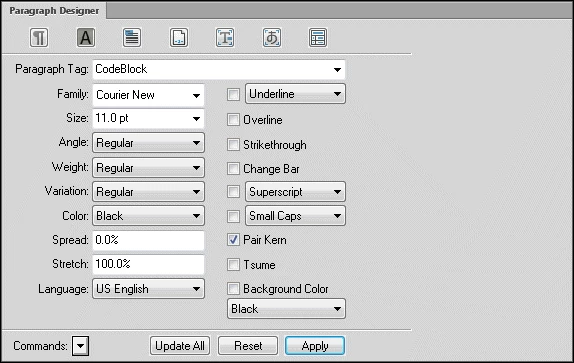
ParaDesigner1

What am I doing wrong?

Marsha 

This topic has been closed for replies.
Correct answer ScottPrentice

Hi Marsha...

The key is in your r/w rules file. You need this ..

element "codeblock"

{

  writer line break is 99999 characters;

  reader line break is forced return;

}

The "writer" rule ensures that the lines don't wrap inadvertently when written to XML (99999 is a bit extreme, but doesn't hurt).

The "reader" rule preserves the line breaks.

You'd insert the codeblock element, type your line and press SHIFT+ENTER for a linebreak, then type the next line. Save and reopen the file and it should be all good.

The only problem (in default FM is that if you want to use elements within the codeblock for formatting on inline content), if the end tag of an inline element "touches" the line break, that line break will be lost on save (or open). You have to manually insert a space between the close tag and the line break mark. (As you might expect, DITA-FMx automatically fixes this problem.) Also .. if your inline tagging wraps to a new line, you'd need to include a r/w rule for that element as well in order to preserve the line breaks within.

Re-reading your post, I'm wondering if the actual problem is that you're pressing ENTER at the end of each line rather than SHIFT+ENTER. If so, that will end the current codeblock and start another. Try SHIFT+ENTER instead.

Cheers,

...scott

1 reply

ScottPrentice
ScottPrenticeCorrect answer
Inspiring
December 19, 2013

Hi Marsha...

The key is in your r/w rules file. You need this ..

element "codeblock"

{

  writer line break is 99999 characters;

  reader line break is forced return;

}

The "writer" rule ensures that the lines don't wrap inadvertently when written to XML (99999 is a bit extreme, but doesn't hurt).

The "reader" rule preserves the line breaks.

You'd insert the codeblock element, type your line and press SHIFT+ENTER for a linebreak, then type the next line. Save and reopen the file and it should be all good.

The only problem (in default FM is that if you want to use elements within the codeblock for formatting on inline content), if the end tag of an inline element "touches" the line break, that line break will be lost on save (or open). You have to manually insert a space between the close tag and the line break mark. (As you might expect, DITA-FMx automatically fixes this problem.) Also .. if your inline tagging wraps to a new line, you'd need to include a r/w rule for that element as well in order to preserve the line breaks within.

Re-reading your post, I'm wondering if the actual problem is that you're pressing ENTER at the end of each line rather than SHIFT+ENTER. If so, that will end the current codeblock and start another. Try SHIFT+ENTER instead.

Cheers,

...scott

Known Participant
December 19, 2013

Hi Scott,

Thanks for your quick reply.

The Shift+Enter works because my R/W file contains this:

element "codeblock" {

  preserve line breaks;

  }

However, how do I now preserve the indents? Do I simply add a "preserve spaces;" line?

Marsha

Known Participant
December 19, 2013

Adding a "preserve spaces;" line didn't work.