


Known Participant
May 30, 2014
Answered

How do I get my LOF to show chapter and page numbers?

  • May 30, 2014
  • 1 reply
  • 425 views

I am working in FM 11. My document has an TOC, LOT, and LOF. My LOF wouldn't update so I created a new one from scratch but can't seem to get the LOF to show the chapter number in the Figure number nor in the page number. The format should be Figure X-Y Figurename ............ X-Z. Where X is the source chapter, Y is the figure number in that chapter, and Z is the page number (Figure 1-1 Architecture.............1-5 showing the first figure in chapter 1 is on page 5 of chapter 1.)

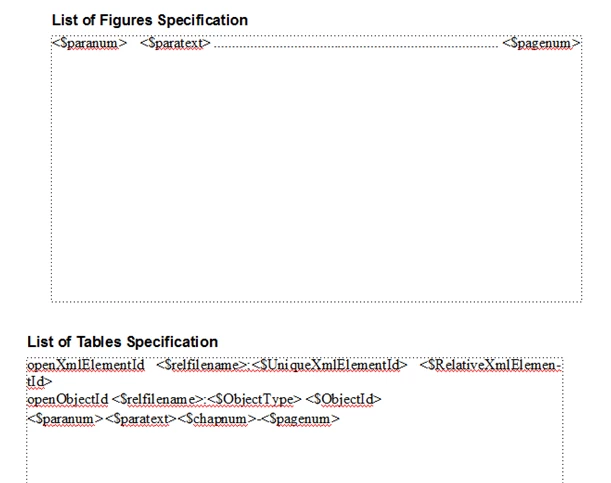
The reference page for the LOT which is correct:
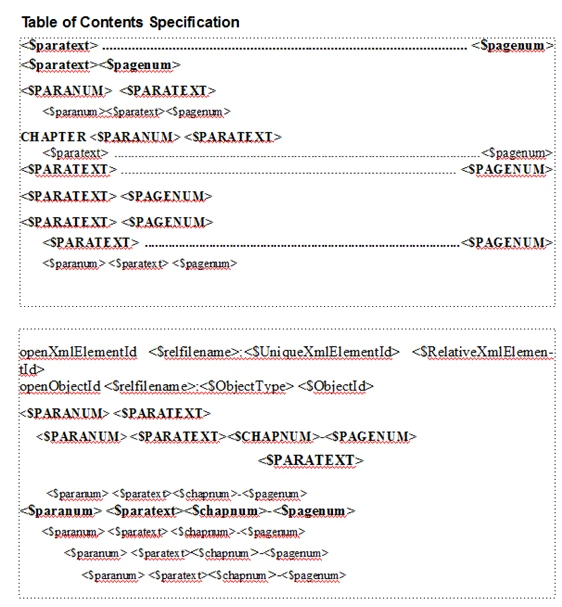
Compared to the reference page for the LOF which only shows me consecutive figure numbers and a page numbers without the chapter prefix:
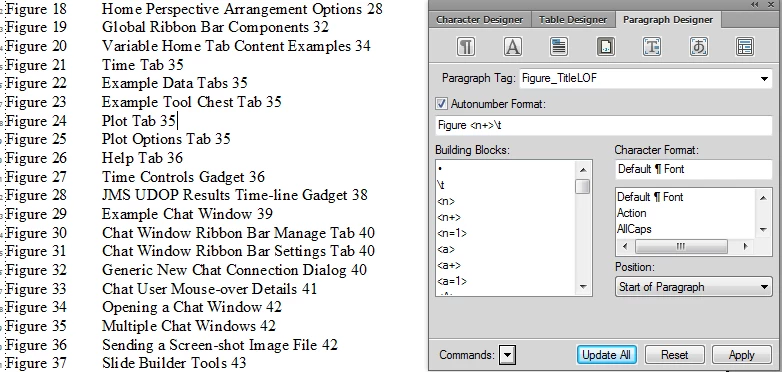
I tried to copy the reference page from either the TOC or LOT. My LOF looks like this:
This topic has been closed for replies.
Correct answer Arnis Gubins

You need to add the <$chapnum> building block in all of the relevant locations that you want FM to display the chapter number (see the TOC for examples). You'll also need to modify some of your paratags to include this in the autonumber (if your content is using this chapter-figure num  combo within your chapter documents).

Also insert tabs in the LOF Reference page definitions, but use the "\t" code instead of an actual tab character so that you know a tab command has been specified. Modify the corresponding paratags to include the desired tab stops.(e.g. for Figure_TitleLOF you should have something like  "<$paranum>\t<$paratext>\t<$chapnum>-<$pagenum>" ).

1 reply

Arnis Gubins
Arnis GubinsCorrect answer
Inspiring
May 30, 2014

You need to add the <$chapnum> building block in all of the relevant locations that you want FM to display the chapter number (see the TOC for examples). You'll also need to modify some of your paratags to include this in the autonumber (if your content is using this chapter-figure num  combo within your chapter documents).

Also insert tabs in the LOF Reference page definitions, but use the "\t" code instead of an actual tab character so that you know a tab command has been specified. Modify the corresponding paratags to include the desired tab stops.(e.g. for Figure_TitleLOF you should have something like  "<$paranum>\t<$paratext>\t<$chapnum>-<$pagenum>" ).

FMdancerAuthor
Known Participant
June 4, 2014

I finally got it to work. I had imported so many reference pages from other chapters I didn't modify the correct line with the updated Figure_Title tag on the reference page. When I understand all of this better, I want to clean up all my reference pages to have only those items I need for each chapter. Thanks.