nancy33534756
Inspiring
March 3, 2016
Answered

How do I get rid of the information balloons that usually give paths and other info I didn't ask for?

  • March 3, 2016
  • 1 reply
  • 566 views

Hi, all.

Frame has done this for years, and I put up with it, but I am thoroughly tired of it. You know the long text balloons that helpfully tell you things you didn't ask, and cover the text you're working in (or the menu you're trying to pick from, and so on).

I couldn't find anything about disabling them, in the archives. How do I kill them once for all?

Thanks.

    This topic has been closed for replies.
    Correct answer Arnis Gubins

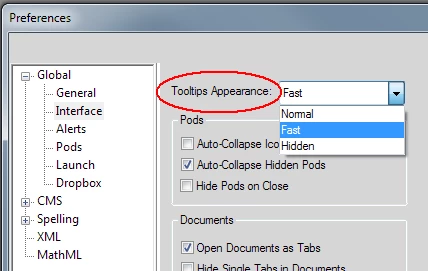
    In the Edit > Preferences under Interface, pick the desired ToolTip appearance mode: Normal, Fast, or Hidden.

    1 reply

    Arnis Gubins
    Arnis GubinsCorrect answer
    Inspiring
    March 3, 2016

    In the Edit > Preferences under Interface, pick the desired ToolTip appearance mode: Normal, Fast, or Hidden.

    nancy33534756
    Inspiring
    March 3, 2016

    Thank you, thank you, Arnis!