
Inspiring
June 22, 2018
Answered

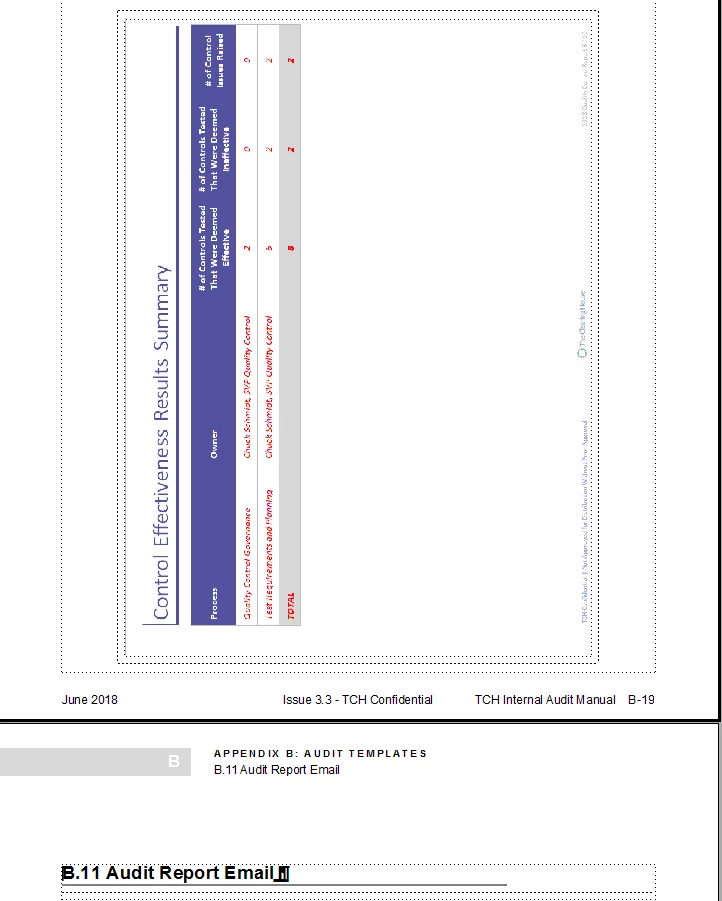
How do I insert a page - graphic to be added

  • June 22, 2018
  • 2 replies
  • 697 views

Hello   

Struggling with this (although it is likely easy once you know how - and I have yet to find a clear set of instructions. I need to add the page in between these two.  I thought in other parts of this document it was automatic based upon where I placed the cursor and began adding new content.

Using FM 2017

Thanks in advance
    This topic has been closed for replies.
    Correct answer Matt-Tech Comm Tools

    Hi Ben, click to the right of the anchored frame (the frame selected in your screenshot, then use File>Import>File to place the image. It should go exactly where you want it, on a new page between the current graphic and the B.11 heading.

    -Matt

    2 replies

    Matt-Tech Comm Tools
    Community Expert
    Matt-Tech Comm ToolsCommunity ExpertCorrect answer
    Community Expert
    June 22, 2018

    Hi Ben, click to the right of the anchored frame (the frame selected in your screenshot, then use File>Import>File to place the image. It should go exactly where you want it, on a new page between the current graphic and the B.11 heading.

    -Matt

    -Matt Sullivan, FrameMaker Course Creator, Author, Trainer, Consultant
    Inspiring
    June 22, 2018

    Easy peasy lemon squeezy....

    Thanks Matt.

    P.S. - is this tidbit in your book (I didn't see it but that doesn't mean anything....)

    Matt-Tech Comm Tools
    Community Expert
    Community Expert
    June 22, 2018

    Yay!

    No, I don't think that one is specifically covered. Your "problem" is that you need to have two anchors immediately following each other, and that's a fairly specific issue that would be difficult to write up, as well as difficult to read.

    -Matt Sullivan, FrameMaker Course Creator, Author, Trainer, Consultant
    Barb Binder
    Community Expert
    Community Expert
    June 22, 2018

    Hi Ben:

    You want to add a page to contain a large image after page B-19? The page is cropped so I don't see the ¶ tag and anchor (or maybe it is on B-18?) Just click after the anchor for the current image on B-19—you may have to use the arrow keys—and use File > Import > File to add the new image. It won't fit on that page so Fm will make a new one for you.

    ~Barb

    ~Barb at Rocky Mountain Training
    Inspiring
    June 22, 2018

    Sorry.  Here is the top of page B-19.  I see no tag/anchor.  None on B-18 either.  I inherited this document so and on top of that I am an extreme novice....
