
Inspiring
Nov 19, 2026 1:53 PM UTC
Answered

How do I insert a special character in Frame 2022?

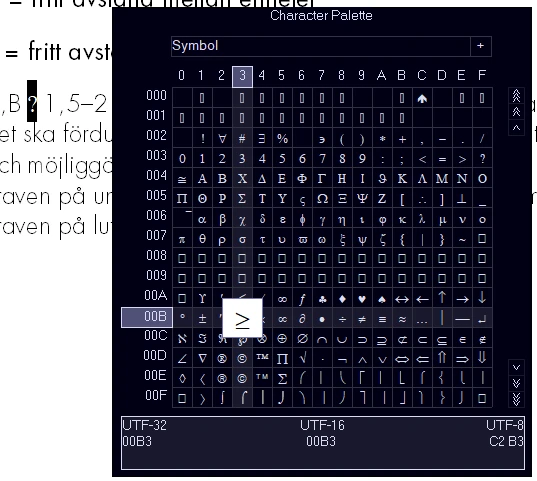
In Frame 7.2 I could easily insert special characters with ascii-codes. No more. I have searched this forum, I have googled and I have read the help pages. Finally I found the Character palette, but how do I use it? I want the questionmark in the picture to be the character in the palette. HOW??


    Winfried RengCorrect answer
    Community Expert
    Nov 19, 2026 2:37 PM UTC

    Hi,

    When I click on a character in this palette, the character is inserted automatically.

    Did you encounter anything special?

    In the online help there are some tables with character sets:

    https://help.adobe.com/en_US/framemaker/using/using-framemaker/user-guide/framemaker-character-sets.html

    When you have the hex code, you have to enter this hex code in the Find/Change pod and click Change. Then the according character is inserted.

    Best regards, Winfried

    8 replies

    Winfried RengCommunity ExpertCorrect answer
    Community Expert
    Nov 19, 2026 2:37 PM UTC

    Hi,

    When I click on a character in this palette, the character is inserted automatically.

    Did you encounter anything special?

    In the online help there are some tables with character sets:

    https://help.adobe.com/en_US/framemaker/using/using-framemaker/user-guide/framemaker-character-sets.html

    When you have the hex code, you have to enter this hex code in the Find/Change pod and click Change. Then the according character is inserted.

    Best regards, Winfried

    Translate
    Community Expert
    Nov 19, 2026 2:41 PM UTC

    When you want to search/replace Unicode characters, you can also use the Unicode number:

    \uxxxx (xxxx is the Unicode code point)

    https://help.adobe.com/en_US/framemaker/using/using-framemaker/user-guide/WS68B8A72C-F7EC-4e0c-BD8F-F4064561DECD_ver12.0.html

    Translate
    Jeff_Coatsworth
    Community Expert
    Community Expert
    Nov 19, 2026 2:11 PM UTC

    You should be able to use ALT- codes too - but I’m no ​@Bob_Niland, so I defer to his vastly superior knowledge about all this character stuff.

    Translate
    Inspiring
    Nov 19, 2026 2:22 PM UTC

    I can’t, and I think I read somewhere that from Frame 9 it was not an option anymore.

    Translate
    Jeff_Coatsworth
    Community Expert
    Community Expert
    Nov 19, 2026 2:42 PM UTC

    Just did a quick test in my FM12 version and ALT-0153 gives me the superscripted trademark character ™ just fine 

    Translate
    Jeff_Coatsworth
    Community Expert
    Community Expert
    Nov 19, 2026 2:01 PM UTC

    Isn’t that 003F in your palette?

    Translate
    Inspiring
    Nov 19, 2026 2:03 PM UTC

    What do you mean? I read somewhere here that the codes in the bottom is not correct for this palette, if that’s what you mean. I actually managed to insert the character right now. The palette is hard to work with as it is so small. But I think I got the hang of it now...

    Translate