


DLindsay
Inspiring
Mar 5, 2019 6:39 PM UTC
Question

How do I make the document title show up in the PDF header tab?

I want to be able to set the text that appears in the title tab for PDFs when they open, and have this text be different to the filename.
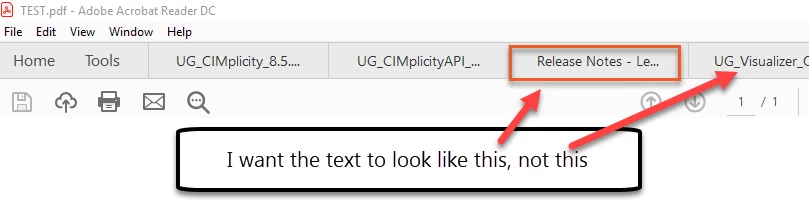
How do you do this?

Ideally I want a way to populate this field based on the bookmap file I start from, second best would be from imported variables. I'm just not sure what to set (in Word the Title property controls it, but manually setting File info > Title, then doing save as PDF from an fm file didn't work, so I'm confused), and how to make that apply to the final PDF...

Help appreciated

Kat

This topic is closed to new replies. Start a new post to keep the conversation going.

7 replies

Participating Frequently
Jul 2, 2019 12:33 PM UTC

Good morning,

In Frame 2019, you can set the PDF tab title using "File Info" in the book file.

  1. Open the book file and choose File > File Info. The File Info window opens.
  2. In the Title field, type the tab title.
  3. Choose Set to commit the change. Save the file.

Now, when you generate the PDF, the new title should appear in the PDF tab title.

I hope this helps

-Forest

Translate
jayaflir
Inspiring
Jan 27, 2020 6:10 AM UTC

From what I see, Acrobat Standard DC behaves differently depending on the PDF publishing engine. When I open a PDF published by the new-for-FM 2019 native PDF publishing engine, the content from the FM 2019 > File > File Info > Title field appears in the Windows title bar. However, when I open a PDF published by Distiller, the file name appears in the Windows title bar. In both cases, though, the content from the FM 2019 > File > File Info > Title field appears in Acrobat Standard DC > File > Properties > Title.

Before you ask, I am using Distiller because it publishes documents with file sizes 10-33% compared to the native PDF publishing engine.

Translate
jayaflir
Inspiring
Jan 27, 2020 6:37 AM UTC

I now see that, when I open a PDF published by Distiller in Google Chrome, the content from the FM 2019 > File > File Info > Title field does appear as the docment title in the browser tab and in the browser window.

Maybe it's an Acrobat Standard-specific issue.

Translate
Community Expert
Mar 6, 2019 11:13 AM UTC

Hi Kat,

When you want to display the document title in the title bar, then you must change the Show setting in Acrobat in the Document Properties (in the File menu or just press CTRL+D) in the Initial View tab.

When you change from File to Document Title the Title value from File info is displayed.

Also the next files which you open will display their Title values.

I do not know, if you can set this Show property via pdfmarks, so that you could set this in FrameMaker via a PostScript text frame. I did not find anything in the pdfmark documents on the web.

I'd say that this is something which the user does or does not.

Best regards

Winfried

Translate
Community Expert
Mar 6, 2019 2:46 PM UTC

Hi Kat,

I had to change the initinal view settings for about 400 files. Therefore I tried to find more infos about this issue.

Acrobat has "Actions" which you can configure to do something for single files or folders of files.

There are some predefined actions, but also some which you can download. And there is also one to change the initial view settings and also the Show Title setting which you need.

See here:

https://acrobatusers.com/actions-exchange

https://helpx.adobe.com/acrobat/using/action-wizard-acrobat-pro.html

Best regards

Winfried

Translate