Inspiring
February 26, 2014
Answered

How do I remove a pipe | symbol that appears to the left of some content?

  • February 26, 2014
  • 1 reply
  • 461 views

I have some content in a unit that has a | symbol to the left of it. How do I get rid of the pipe?

I've tried View > Track Text Edits > Accept All, but it doesn't help.

I'm using FM version 11.0.2.384.

Thanks and regards

This topic has been closed for replies.
Correct answer Arnis Gubins

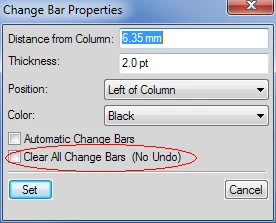
That sounds like you have change bars enabled (or perhaps these were at one point and now have been turned off). To get rid of change bars, you need to use the Format > Document > Change Bars... option and enable the "Clear All Change Bars" option.

You might want to make a copy of the file first in case someone ever  wants to see where the changes have occurred.

1 reply

Arnis Gubins
Arnis GubinsCorrect answer
Inspiring
February 26, 2014

That sounds like you have change bars enabled (or perhaps these were at one point and now have been turned off). To get rid of change bars, you need to use the Format > Document > Change Bars... option and enable the "Clear All Change Bars" option.

You might want to make a copy of the file first in case someone ever  wants to see where the changes have occurred.

RoxanneMAuthor
Inspiring
February 26, 2014

Hurray! Thanks for helping me resolve this.