Lew32093916a23q
Participant
April 18, 2024
Answered

How do I remove useless color options from this dropdown?

  • April 18, 2024
  • 2 replies
  • 673 views

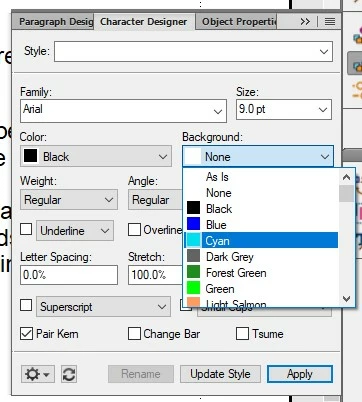
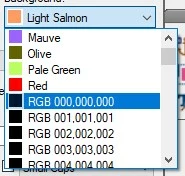
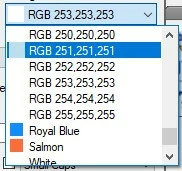
I am marking up and editing an old, poorly written FM document and I need to highlight numerous different kinds of problems in the document with different colors. I have absolutely no use for these non-colors taking up room in this dropdown:


Does anyone know how to delete these useless color choices?


Thanks!

    This topic has been closed for replies.
    Correct answer frameexpert

    Most of the time, these RGB prefixed colors are added by graphics imported into FrameMaker. So when you delete them, they may return. If you are sure that there are no colors with these names applied to native FrameMaker objects, you can use the script below to delete them. If you delete a color applied to a native FrameMaker object (for example, a paragraph), it will be replaced with Black.


    To run the script below, copy and paste it into a plain text document and save it with a .jsx extension. Then open your FrameMaker document, and choose File > Script > Run, and select the script. Alternatively, you can add it to the Script Library so you can run it from the panel (File > Script > Catalog).


    #target framemaker
    
    main ();
    
    function main () {
        
        var doc;
        
        doc = app.ActiveDoc;
        if (doc.ObjectValid () === 1) {
            processDoc (doc);
        }
    }
    
    function processDoc (doc) {
        
        var regex, color, nextColor;
        
        // Regular expression for colors that start with RGB.
        regex = /^RGB/;
        
        color = doc.FirstColorInDoc;
        while (color.ObjectValid () === 1) {
            nextColor = color.NextColorInDoc;
            if (regex.test (color.Name) === true) {
                color.Delete ();
            }
            color = nextColor;
        }
    }

    2 replies

    Bob_Niland
    Community Expert
    Community Expert
    April 18, 2024

    See also this older discussion: Deleting Color Definitions

    which may provide hints, esp. if the colors keep coming back.

    Lew32093916a23q
    Participant
    April 18, 2024

    Thank you about twenty times over!


    frameexpert
    Community Expert
    frameexpertCommunity ExpertCorrect answer
    Community Expert
    April 18, 2024

    Most of the time, these RGB prefixed colors are added by graphics imported into FrameMaker. So when you delete them, they may return. If you are sure that there are no colors with these names applied to native FrameMaker objects, you can use the script below to delete them. If you delete a color applied to a native FrameMaker object (for example, a paragraph), it will be replaced with Black.


    To run the script below, copy and paste it into a plain text document and save it with a .jsx extension. Then open your FrameMaker document, and choose File > Script > Run, and select the script. Alternatively, you can add it to the Script Library so you can run it from the panel (File > Script > Catalog).


    #target framemaker
    
    main ();
    
    function main () {
        
        var doc;
        
        doc = app.ActiveDoc;
        if (doc.ObjectValid () === 1) {
            processDoc (doc);
        }
    }
    
    function processDoc (doc) {
        
        var regex, color, nextColor;
        
        // Regular expression for colors that start with RGB.
        regex = /^RGB/;
        
        color = doc.FirstColorInDoc;
        while (color.ObjectValid () === 1) {
            nextColor = color.NextColorInDoc;
            if (regex.test (color.Name) === true) {
                color.Delete ();
            }
            color = nextColor;
        }
    }

    Lew32093916a23q
    Participant
    April 18, 2024

    Tremendous. THANK YOU!

    Matt-Tech Comm Tools
    Community Expert
    Community Expert
    April 19, 2024

    If any of these fix your issue, please mark it as Correct to help others.

    -Matt Sullivan, FrameMaker Course Creator, Author, Trainer, Consultant