
Known Participant
November 20, 2018
Answered

How do I separate elements in a footer?

  • November 20, 2018
  • 1 reply
  • 574 views

I know how to insert variables and text in a footer, but I am trying to separate the different elements for example, I would like the title on the left side of the footer and the page# on the right side. I've experimented with tab stops, but it is not giving me the desired results. Thanks in advance.
This topic has been closed for replies.
Correct answer FieryPantone

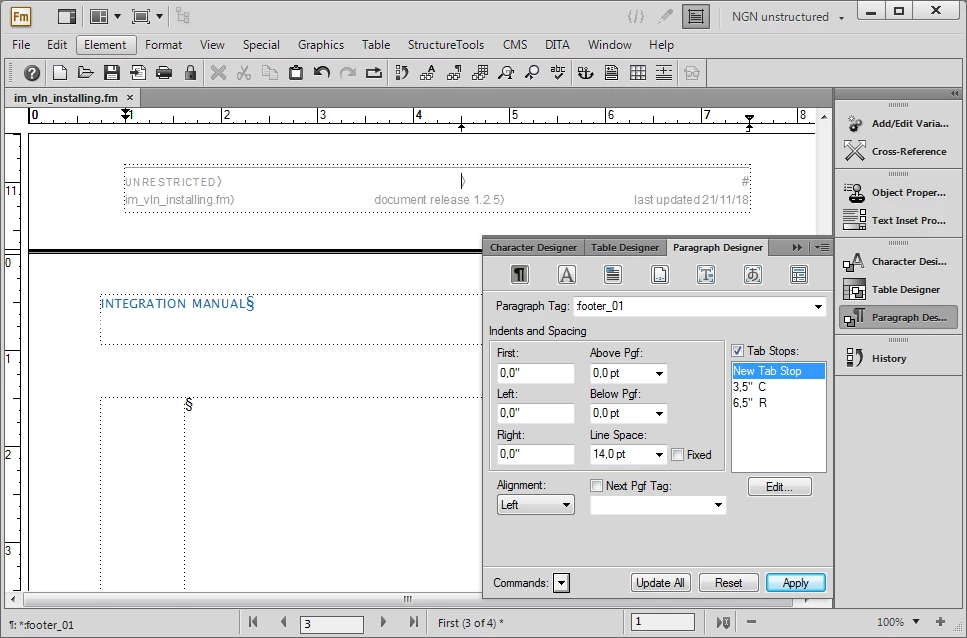
I would have thought you'd be OK, as long as you've set up the tabs you want in your footer style. Mine looks like this …

1 reply

FieryPantoneCorrect answer
Legend
November 21, 2018

I would have thought you'd be OK, as long as you've set up the tabs you want in your footer style. Mine looks like this …

Legend
November 21, 2018

Yep. The trick is, to set up a dedicated paragraph style (maybe 2, for facing pages) and then define left/right-aligned tabulators for them.

Known Participant
November 21, 2018

Thank you. Makes sense.