
Known Participant
January 18, 2012
Answered

How do I show both page number styles in PDF toolbar?

  • January 18, 2012
  • 1 reply
  • 719 views

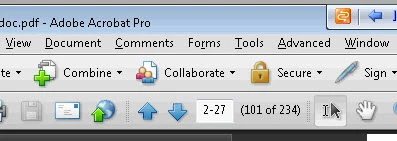
In this screenshot, both the chapter-page and overall page of the PDF are listed in the toolbar.  2-27 (101 of 234)

What setting in FM do I specify to get this result in my PDF?  I've looked everywhere I can think of.
Thanks,

Dave

This topic has been closed for replies.
Correct answer Arnis Gubins

Dave,

Those are referred to as "Page Labels" in Acrobat. You can either:

- set them manually in Acrobat or

- use Rick Quatro's PageLabeler plugin (http://www.frameexpert.com/plugins/pagelabeler/index.htm) or

- depending upon your required format you could also use Shlomo Perets' TimeSavers (http://www.microtype.com/ImprovePDF19.html).

1 reply

Arnis Gubins
Arnis GubinsCorrect answer
Inspiring
January 18, 2012

Dave,

Those are referred to as "Page Labels" in Acrobat. You can either:

- set them manually in Acrobat or

- use Rick Quatro's PageLabeler plugin (http://www.frameexpert.com/plugins/pagelabeler/index.htm) or

- depending upon your required format you could also use Shlomo Perets' TimeSavers (http://www.microtype.com/ImprovePDF19.html).

Known Participant
January 18, 2012

Thank you soooo much! :-)