

Participating Frequently
January 14, 2014
Question

How to add a table in the header section

  • January 14, 2014
  • 2 replies
  • 626 views

I would like it to look similar to this:
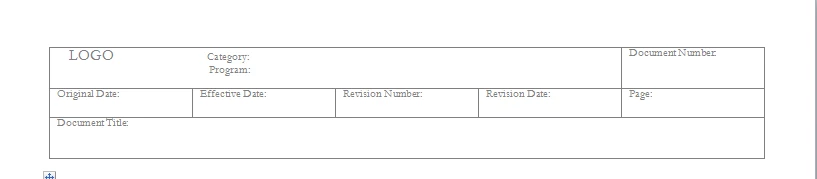
I would like for this to show on each page of the document.  This would be a multi-page standalone document.

    This topic has been closed for replies.

    2 replies

    Bob_Niland
    Community Expert
    Community Expert
    January 14, 2014

    As Arnis says, this is a routine way of organizing header and footer content.

    The H/F text frames typically exist by default in newly created documents. if not, be sure they are Background frames.

    You may need to pull up the top edge of the text frame to account for the usually empty paragraph to which the table is anchored.

    You can use separate tables for Left and Right page layouts, so that edge-sensitive content like Page# is where you want it on facing pages.

    The table can be bordered or borderless.

    If you need a date cell that is specific to the revision of that page, well, that's another matter.

    Arnis Gubins
    Inspiring
    January 14, 2014

    Just insert the desired table in the background header text frame on the relevant Master Pages and it will appear on all pages.

    renvetteAuthor
    Participating Frequently
    January 14, 2014

    Awesome and thank you.  Can you send basic instructions on how to do this?  I'm a bit new to the software.

    Thanks again.

    Jeff_Coatsworth
    Community Expert
    Community Expert
    January 15, 2014

    Suggest that you pick up a copy of the FM bible – Publishing Fundamentals for FM11 by Matt Sullivan – to help you out.