
Participant
July 1, 2024
Answered

How to add border line in table for specific row?
  • July 1, 2024
  • 1 reply
  • 362 views

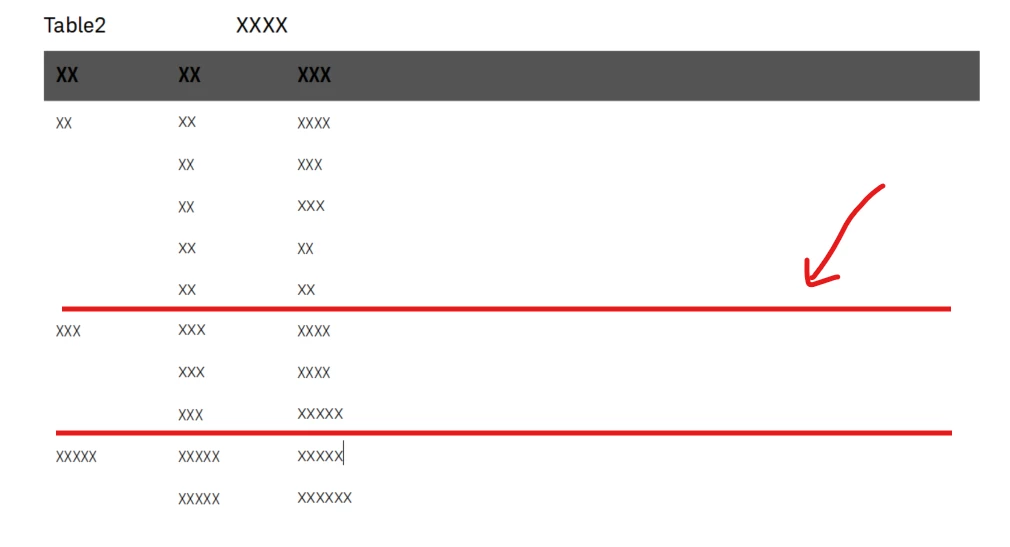
How can I add a specfic line in the table as mention in red? As from the table designer > ruling, i am only able to choose on specific number of rows. The rows that I wanted to draw the line is not consistent.

    This topic has been closed for replies.
    Correct answer FrameMaker-dk

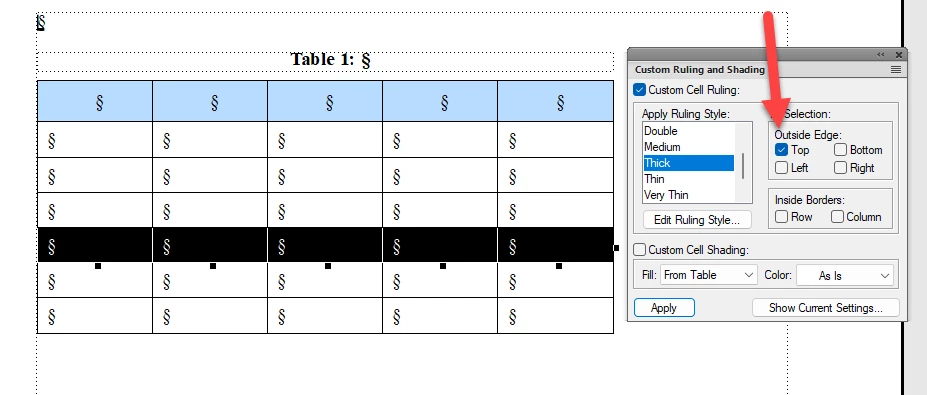
    You need to use the Custom Ruling and Shading palette found under the Table menu.

    Select the row you want to have a thick ruling above.

    In the Custom Ruling and Shading deselect everything excetp the Top selection and Thick.

    Click Apply.

    Please note, that using the Custom Ruling and Shading is making overrides to you table. These settings will not become part of the tables format/style.


    1 reply

    FrameMaker-dkCommunity ExpertCorrect answer
    Community Expert
    July 1, 2024

    You need to use the Custom Ruling and Shading palette found under the Table menu.

    Select the row you want to have a thick ruling above.

    In the Custom Ruling and Shading deselect everything excetp the Top selection and Thick.

    Click Apply.

    Please note, that using the Custom Ruling and Shading is making overrides to you table. These settings will not become part of the tables format/style.


    Bjørn Smalbro - FrameMaker.dk
    frameexpert
    Community Expert
    Community Expert
    July 1, 2024

    If you have a lot of table rows to process, this could be scripted.