Inspiring
February 27, 2017
Répondu

How to add Recovered Files to FM Book???

HI All,

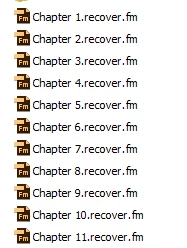
Having quiet a bit of issues with FM12: Created a Book, with crash, it created Recovery Files as shown in the image below:

Now I am starting with new Book.

When I add these files, It does not add to the book (no message, nothing).

When I rename the files and then add to the book, I get message Not Recognized Format.

I would appreciate any response. Thanks.

    Ce sujet a été fermé aux réponses.
    Meilleure réponse par Bob_Niland

    re: I am trying to understand what is the purpose if these files, if they may be corrupt?

    Often they are not corrupt, or the corruption may be limited to the last edit you were making, or could be isolated to just one spot of document structure elsewhere (and FM detecting inconsistent structure is probably grounds for aborting itself). The .recover, plus your .backup, usually get you back on track.

    .recover is FM's best effort to save your work when it detects an error that is going to result in it crashing. It presumably uses MIF so that if the crash crashes partway through, you at least have a plainttext markup file from which to recover some work. More usually, you can recover all of your content, and most if not all of your formatting. A partially-written .fm binary file might be entirely un-openable, even with Heroic Open.

    If the writes complete, you get a files that FM can open as well. If the crash crashes (or the Window, VM, or whole OS does), you might get nothing at all, as was the case for the Error 7103 crashes I used to get in a former assignment - FM would just wink out without a trace. Save early and often. Backup the entire job daily at least.

    Always keep in mind that the first thing FM usually does on opening file xyzzy.fm is to over-write file xyzzy.backup.fm, so when recovering from a crash, first make copies of everything.

    1 commentaire

    Bob_Niland
    Community Expert
    Community Expert
    February 27, 2017

    .recover.fm may be a reserved name in FM, and it's wise to avoid using such an extension for production files.

    If later FMs still work the same way as legacy FMs, a .recover file is actually a MIF file, and not a .fm binary, despite the .fm extension.

    .recover files are only assured to be syntactically correct, and can have corrupt content.

    Open each .recover individually. Verify contents and structure. Re-save without the .recover. Then bring into book.

    AixtronAuteur
    Inspiring
    February 27, 2017

    Hello Bob Niland,

    Appreciate your response. Now I understand that .recover files are infact MIF file and not FM file (despite their .fm extention).

    I am trying to understand what is the purpose if these files, if they may be corrupt?

    One thing I can think of that it would give your all your data in file, but even then it would be quite time consuming to bring in new FM file and then format it all again...

    If anyone has any insight, I would appreciate it.

    Thank You.

    Bob_Niland
    Community Expert
    Bob_NilandCommunity ExpertRéponse
    Community Expert
    February 27, 2017

    re: I am trying to understand what is the purpose if these files, if they may be corrupt?

    Often they are not corrupt, or the corruption may be limited to the last edit you were making, or could be isolated to just one spot of document structure elsewhere (and FM detecting inconsistent structure is probably grounds for aborting itself). The .recover, plus your .backup, usually get you back on track.

    .recover is FM's best effort to save your work when it detects an error that is going to result in it crashing. It presumably uses MIF so that if the crash crashes partway through, you at least have a plainttext markup file from which to recover some work. More usually, you can recover all of your content, and most if not all of your formatting. A partially-written .fm binary file might be entirely un-openable, even with Heroic Open.

    If the writes complete, you get a files that FM can open as well. If the crash crashes (or the Window, VM, or whole OS does), you might get nothing at all, as was the case for the Error 7103 crashes I used to get in a former assignment - FM would just wink out without a trace. Save early and often. Backup the entire job daily at least.

    Always keep in mind that the first thing FM usually does on opening file xyzzy.fm is to over-write file xyzzy.backup.fm, so when recovering from a crash, first make copies of everything.
