Known Participant
August 19, 2023
Question

How to add TOC style in Bookmarks paragraph tag

  • August 19, 2023
  • 2 replies
  • 219 views

Hi Team,


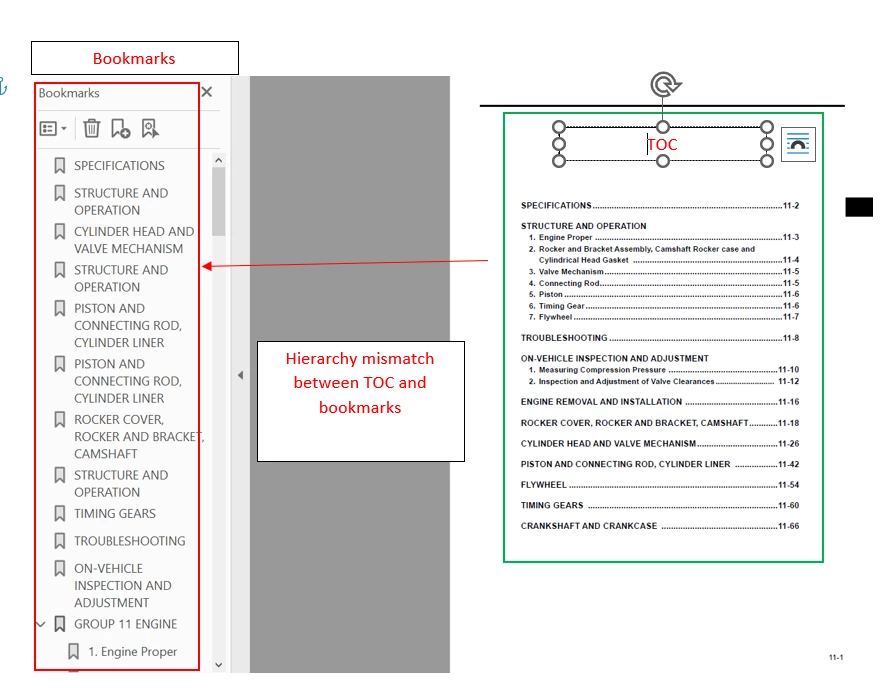
  1. I need content in TOC hierarchy to be present in PDF book marks panel and i tries the settings in FM couldn't get the expected result (There is a hierarchy mismatch between TOC & Bookmarks in final PDF).

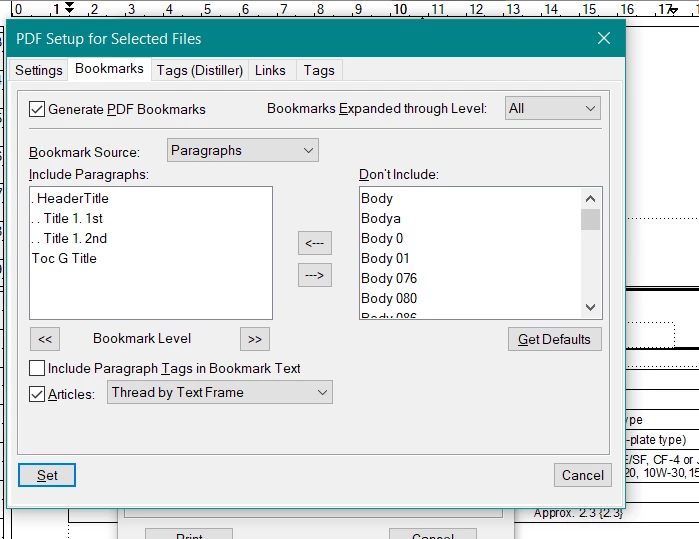
  2. Need your ideas to add TOC styles in bookmark section. How to add TOC styles in File>Print book>Bookmarks>Paragraphs.

  3. i tried with "heading styles in Frame maker paragraph" which generated the bookmarks with the hierarchy level mismatch (same tree structure not came in final PDF)


If i include TOC styles i can take easily generate bookmarks with TOC structure.


For more details please refer the attached screenshots


Kindly support !


    This topic has been closed for replies.

    2 replies

    Barb Binder
    Community Expert
    Community Expert
    August 20, 2023

    Nithya:


    An easy way to scan for disconnected pages is zoom all the out to 25% magnification so that you can see a lot of pages at the same time, click in the text on page 1 and choose Edit > Select All and scroll through the document.


    Is the entire document highlighted, or does the highlighting stop abruptly or skip some pages? If you find that sections are disconnected, select that content, cut it and paste it into the main flow. Once the disconnected pages are empty, you can delete them.


    ~Barb

    ~Barb at Rocky Mountain Training
    K.Daube
    Community Expert
    Community Expert
    August 20, 2023

    That reminds me on my own problem reported at this post. You may check for disconnected pages in your document.