

Stefan Eike
Inspiring
November 11, 2020
Answered

How to avoid "duplicate" paragraph formats for handling different fonts

  • November 11, 2020
  • 3 replies
  • 1066 views

Hi supercalifragilisticexpialidocious FrameMaker experts,


we have a company font. The problem is, that this font does not cover all chars that we need to display. We have issues in greek and in almost all Asian languages. I see the following options I don't like any of them. Do you have a preference or a better idea?


  • A) We crack all the fonts and create a new global-font and merge in all the glyphs. This is technically probably even the most simple solution, but this is illegal, so we cannot do that.
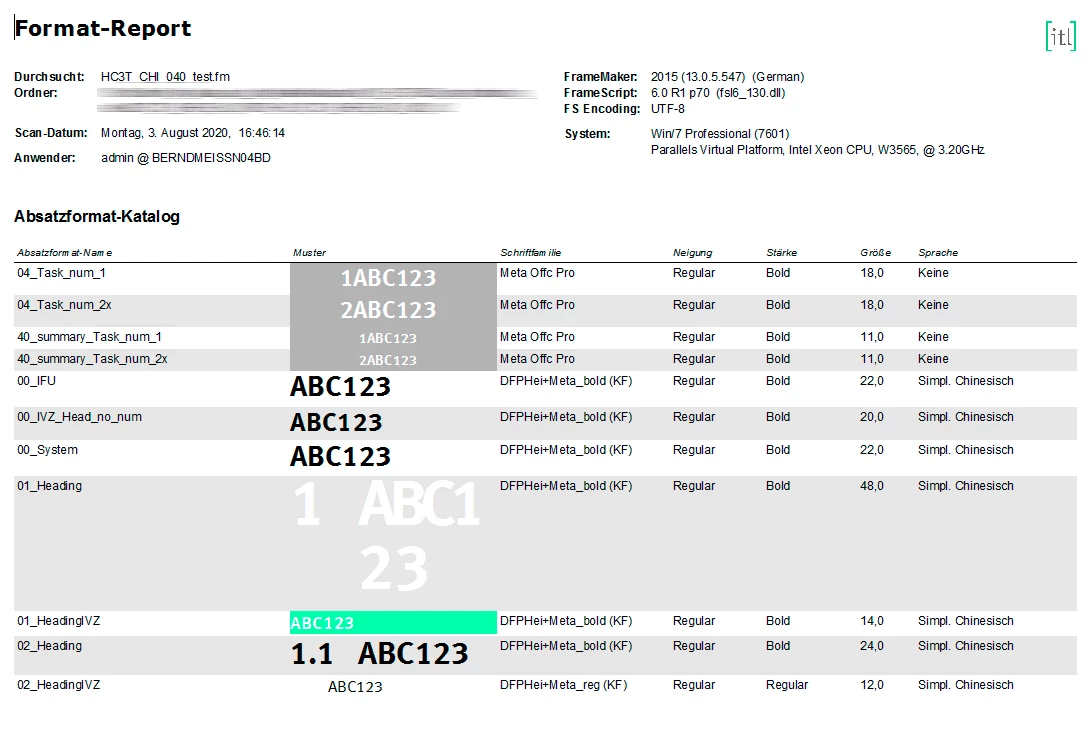
  • B) We create language specific paragraph formats like "Heading" (for western language), "EL Heading" for Greek, "VI Heading" for Vietnamese and so forth. This would work, but would incredibly blow up the amount of formats that we have. This is a nightmare to maintain, as we also have different templates in different paper sizes and so forth.
  • C) We create language specific templates. This is basically B) with the benefit that the technical author does not recognize, that we have tons of formats to handle (as he only sees what is used in the file he is actually editing).
  • D) We create a script that overrides the font-families for a specific document. So, it would iterate over all paragraph formats and would replace font-family A with font-family B.


The favorite solution is currently D. I was wondering if FrameMaker has some kind of font-fallback mechanism to do something like this automatically. What do you think?


All the best
Stefan
    This topic has been closed for replies.
    Correct answer Be.eM

    Hello Winfried,

    that's a misunderstanding. In our cases a "Template" is nothing but a FrameMaker document only containing the paragraph and character formats and the combined fonts. This is what we import into the translated documents. Nothing else.

    Page layouts are taken from the current master document, including all visual elements like logos etc.

    I'm just explaining this in contrast to only changing the font (option D), because language specific settings contain more than just a font with the required characters.

    Bernd

    3 replies

    Bob_Niland
    Community Expert
    Community Expert
    November 11, 2020

    You've identified the core problem, which is that the corporation's font is inadequate for actual business needs.

    To confirm what Winifred reported, FM does not yet do font fallback (and I don't know if anyone has even requested it yet).

    If suitably open-licensed fonts can be found that populate the codepoints needed, building a merged font might actually be legal (but would require pondering implications for the resulting font to also follow the license being leveraged).

    Bob_Niland
    Community Expert
    Community Expert
    November 12, 2020

    re: FM does not yet do font fallback (and I don't know if anyone has even requested it yet).

    It doesn't look like anyone has requested it yet.
    And it's fraught with potential problems.
    There are the gnarly technical problems with doing it at all, covered in some depth in this blog article by Marcin Wichary: When fonts fall

    There's a specific problem if a missing character has to be handled in FM8-FM2020 by falling back to a decomposition that includes any Unicode code points in the SMP.

    As the instant case above suggests, there's also a concern that the software might fall back to a font that's not embeddable or otherwise not licensed for purpose.

    I suspect FM will get SMP support before fallback gets addressed, although it might happen all at the same time, as part of a major overhaul to FM's Unicode support. It will need additions to at least the .ini file, or some other means for prioritizing font selection in fallback, much as is presently done for entirely missing fonts.

    Stefan Eike
    Inspiring
    November 12, 2020

    Thanks a lot, Bob. When fonts fall is a very good read and probably one of the best (and longest) blog posts I've ever read.

    Be.eM
    Inspiring
    November 11, 2020

    Hello Stefan,

    I'd prefer option C (specific templates). It's as easy as importing the template formats into the book with all chapters. The big advantage: You do not only replace the font (as in option D), but also language specific paragraph format settings like the Asian composer, language, etc. You can also create combined fonts for the Asian languages, which also can be imported from templates.


    We're doing this here for many of our documents. It's basically a list of all paragraph and character formats (created by a script), which we use as a template for format import. When we get files from translation, we just import the formats from the respective templates (in our case mostly for Chinese simplified/traditional, Japanese, Korean, Arabic, Farsi), and… tadaaa… all is well.


    Regards,

    Bernd

    Community Expert
    November 11, 2020

    Hi Bernd,


    Years ago I also used your approach. However, when there are changes in the template (e.g. the logo changes, spacing of paragraph formats, content of a copyright text frame), then I have to change each language template. Very error prone.

    When do templates change? In my case maybe every 3 months. Not that often. Still I do not want to have general templates x languages.

    Therefore I prefer a script which does this.


    Best regards


    Winfried

    Be.eM
    Be.eMCorrect answer
    Inspiring
    November 11, 2020

    Hello Winfried,

    that's a misunderstanding. In our cases a "Template" is nothing but a FrameMaker document only containing the paragraph and character formats and the combined fonts. This is what we import into the translated documents. Nothing else.

    Page layouts are taken from the current master document, including all visual elements like logos etc.

    I'm just explaining this in contrast to only changing the font (option D), because language specific settings contain more than just a font with the required characters.

    Bernd

    Community Expert
    November 11, 2020

    Hi Stefan,


    No. FrameMaker does not substitute fonts, when characters are missing.

    Only missing fonts are substituted.

    I also think that D is the best solution. I have something similar which changes the language of all formats (also opens all table formats and changes the language in its paragraph formats), changes cross-reference formats, variables, etc.


    Best regards


    Winfried