
Participant
January 28, 2024
Question

How to change the DangerBlock in the reference pages?

  • January 28, 2024
  • 3 replies
  • 192 views

Hello there, 
I want to edit the Danger block (also to add Warning and Attention ones). I want to make them to look like the picture below with the option to write inside: 
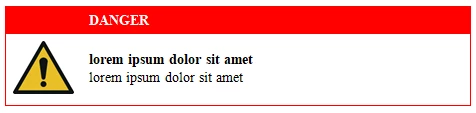
Is it possible to do this with FrameMaker? 
Thank you! 
Mariya

    This topic has been closed for replies.

    3 replies

    Bob_Niland
    Community Expert
    Community Expert
    January 28, 2024

    Apart from the how-to question, also make inquiries in your organization as to what safety standard(s) this is attempting to comply with. It doesn't appear to be compliant with any that I've worked with.
    The red isn't a Safety Red.
    For a DANGER, the ⚠ alert symbol would not be Yellow.
    A serif font may be incorrect for the signal word.

    Barb Binder
    Community Expert
    Community Expert
    January 28, 2024

    I'm back. As I was leaving, I reread the title and realize you want to put this on the reference page. Are you going to copy and paste it to the body pages or are you going to insert it via paragraph style?


    Either way, you can create it a body page and then copy it to a text frame on the reference pages and go from there.


    ~Barb

    ~Barb at Rocky Mountain Training
    Barb Binder
    Community Expert
    Community Expert
    January 28, 2024

    Hi @Mariya33467286eyae:


    I see you are new here—welcome! 


    I would approach this as a two row, two column table:

    • I would make the top row a heading row with the two cells straddled (merged) and assigned a red background. Assign CellHeading the color white. 
    • In the second row, make the first column narrow enough to just accommodate the image you add into that cell. Format CellBody to handle the text to the right.
    • The entire table will need a red border around the outside. 
    • Save this table as a table style so that you can assign the formatting to future tables. 


    This example is a bit different from yours, but hopefully you will find it helpful:
    https://www.rockymountaintraining.com/adobe-framemaker-icons/


    ~Barb


    ~Barb at Rocky Mountain Training
    Participant
    January 29, 2024

    Hello Barb, 
    Thank you! 🙂 
    I decided to make it a table style as you explained, which works better than my initial idea to have it in the reference pages. 

    Thanks again! 
    Mariya