mary_n_fingerlakes
Known Participant
May 1, 2026
Question

How to Create and Superscript the French-Canadian trademark symbol, "MD" in Adobe FrameMaker

  • May 1, 2026
  • 4 replies
  • 36 views

This post is a great resource on how to retain the superscript character format in a variable. When I apply those steps to create the French-Canadian registered trademark, “MD”, I get the following results:
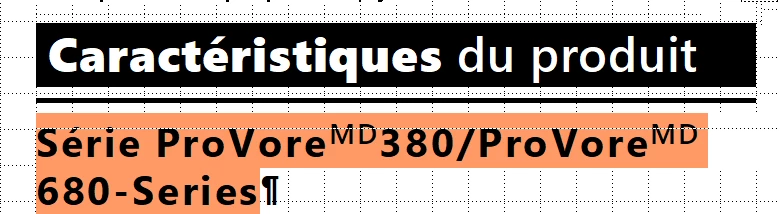


Here is what I did:

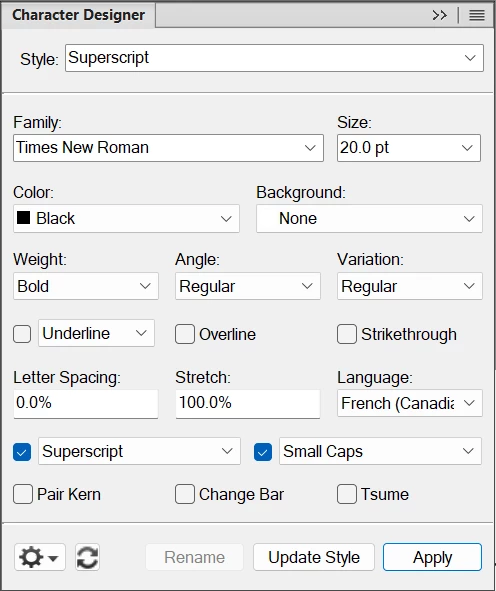
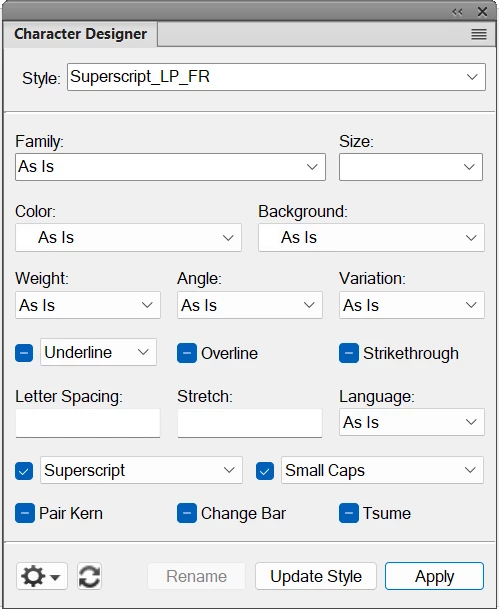
I created the character style:
 

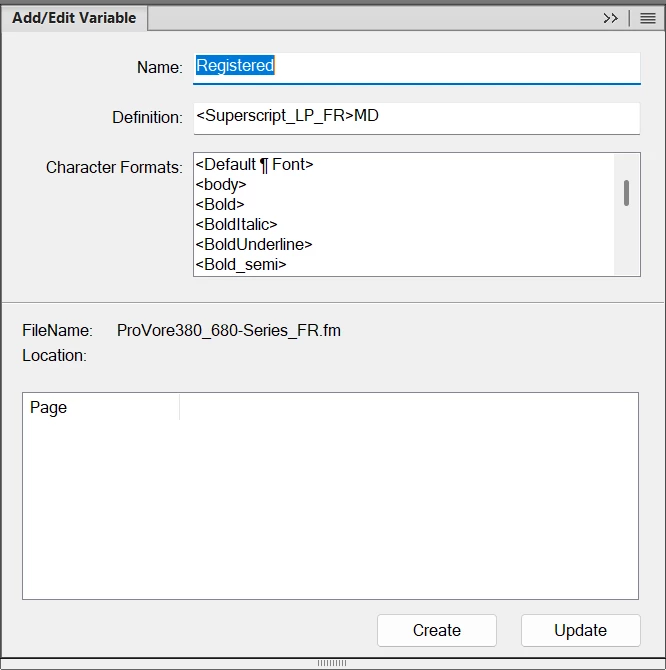
I created the Registered variable:
And I updated the existing variable that requires the registered trademark:

Any help would be appreciated.

Thank you!
    4 replies

    Bob_Niland
    Community Expert
    Community Expert
    May 1, 2026

    This does require a work-around in FM to date.

    Another hack might use:
    ᴹ U+1D39 MODIFIER LETTER CAPITAL M 
    ꟲ U+A7F2 MODIFIER LETTER CAPITAL C
    ᴰ U+1D30 MODIFIER LETTER CAPITAL D

    On that approach ᴹᴰ would be a variable defined as
    Definition: \u1D39\u1D30
    which might avoid needing a character format, if your main font populates those codepoints. This construct would of course not have useful semantics.

    If done as a variable, however defined, I’d suggest using my convention for Unicode work-arounds, and name it:
    Name: U1F16B RAISED MD SIGN
    This floats it to the bottom of the Variables pane, groups all such work-arounds together, and makes the intent more or less apparent to future document stewards, who someday may revise it to:

    Since 2012, Unicode 6.1, these codepoints have been defined:
    🅪 U+1F16A RAISED MC SIGN
    🅫 U+1F16B RAISED MD SIGN
    Even if you have a font that populates them, FM can’t render them, as they are in the SMP (above code point U+FFFF). You’ll get “?” or “??”. If FRMAKER-10976 gets addressed, this might change.

    Matt-Tech Comm Tools
    Community Expert
    Community Expert
    May 1, 2026

    Your last example looks like you need to set a smaller size on the character tag.

    For the positioning, it sounds like you might want to drop the baseline shift.

    That’s an option, but not part of the UI for the paragraph and character designers.

    You should be able to do it by creating a MIF snippet that controls the <FDY> property.

    See FrameMaker - Working with Content p. 484 for a walkthrough.

    -Matt Sullivan, FrameMaker Course Creator, Author, Trainer, Consultant
    mary_n_fingerlakes
    Known Participant
    May 1, 2026

    @Matt-Tech Comm Tools ​@Dave Creamer of IDEAS ​@FrameMaker-dk - thanks for your support on this. I’m still struggling and need to take a break from this issue for today. I’ll come back to it on Monday with fresh eyes. Thank you.

    Dave Creamer of IDEAS
    Community Expert
    Community Expert
    May 1, 2026

    It looks like the (long) variable is doing exactly what the first screen capture shows. What is your question/problem?

    David Creamer: Community Expert (ACI and ACE 1995-2023)
    mary_n_fingerlakes
    Known Participant
    May 1, 2026

    Hi ​@Dave Creamer of IDEAS - I should have been more clear in my initial post--my apologies.

     I believe the “MD” should be in small caps and superscript like in the example below. Thanks!


    Dave Creamer of IDEAS
    Community Expert
    Community Expert
    May 1, 2026

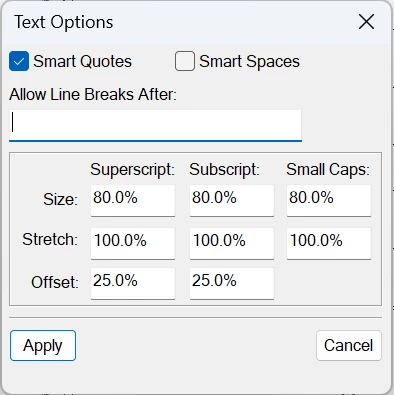
    Your character style needs to change the font. Then adjust your superscript settings (they are global for the document) for the position and size percentage. You can play with the font size in the character style but I would do the global settings first.

    David Creamer: Community Expert (ACI and ACE 1995-2023)
    Community Expert
    May 1, 2026

    … but have you not gotten what you wanted? Where does the variable not look right?

    Bjørn Smalbro - FrameMaker.dk
    mary_n_fingerlakes
    Known Participant
    May 1, 2026

    @FrameMaker-dk - I have not gotten the results I want. I believe the “MD” should be in small caps and superscript like in this example:


    But mine looks like this:


    And this: