Oleg_Shynkarenko
Known Participant
May 16, 2021
Answered

How to edit a System Variable (was: "How to edit an element in FrameMaker?")

  • May 16, 2021
  • 2 replies
  • 469 views

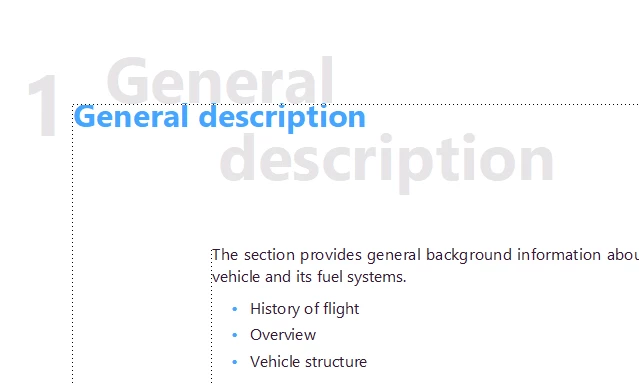
While trying to understand the properties of the Chapter Title's shadow in the sample below: 


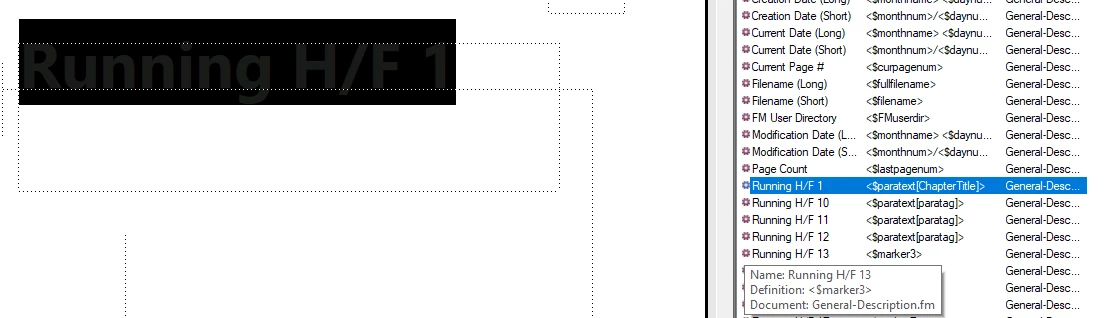
I found that it has some kind of settings in the Master Page view, see below:


But what it is? How is this "Running H/F 1" element called? How can I create or edit it? Is there some panel or toolbar to create or edit (delete) this element? I looks like a variable, because I see it in the Variables panel.

This topic has been closed for replies.
Correct answer Stefan Gentz

It's a so called "System Variable" named "Running HF/1" (= Running Header/Footer 1).

The definition of this System Variable in this sample document is this: <$paratext[ChapterTitle]>.


<$paratext[ChapterTitle]> is called a <Building Block>. With this system variable FrameMaker pulls the paragraph text ($paratext) from the first paragraph on the body page that has the paragraph style "ChapterTitle" assigned (which is in this example the paragraph style assigned to the blue text "General Description" on the body page).


To change it to pull the text from some other paragraph, with a different style assigned (let's say "Heading1"), select the variable in the Variables panel, and click the Edit button at the top of the Variables panel (looks like a small pen icon). This opens the Edit System Variable dialog where you can change it, to e.g. pull the ext from the first Heading1 paragraph: <$paratext[Heading1]>.


How that "shadow" looks like is defined in the paragraph style "ChapterTitleShadow".


To delete the "shadow paragraph" just go into the master page "ChapterTitle", click into the text frame where the variable, select the variable and delete it. Or just delete the whole text frame.


2 replies

Community Manager
May 16, 2021

Note: I have changed the subject of this thread from "How to edit an element in FrameMaker?" to "How to edit a System Variable" to avoid confusion. The term "Element" is used in context of XML usually 🙂

Stefan GentzCommunity ManagerCorrect answer
Community Manager
May 16, 2021

It's a so called "System Variable" named "Running HF/1" (= Running Header/Footer 1).

The definition of this System Variable in this sample document is this: <$paratext[ChapterTitle]>.


<$paratext[ChapterTitle]> is called a <Building Block>. With this system variable FrameMaker pulls the paragraph text ($paratext) from the first paragraph on the body page that has the paragraph style "ChapterTitle" assigned (which is in this example the paragraph style assigned to the blue text "General Description" on the body page).


To change it to pull the text from some other paragraph, with a different style assigned (let's say "Heading1"), select the variable in the Variables panel, and click the Edit button at the top of the Variables panel (looks like a small pen icon). This opens the Edit System Variable dialog where you can change it, to e.g. pull the ext from the first Heading1 paragraph: <$paratext[Heading1]>.


How that "shadow" looks like is defined in the paragraph style "ChapterTitleShadow".


To delete the "shadow paragraph" just go into the master page "ChapterTitle", click into the text frame where the variable, select the variable and delete it. Or just delete the whole text frame.