
Participant
May 26, 2025
Question

How to find a Mini-TOC in a document?

  • May 26, 2025
  • 3 replies
  • 474 views

Hi, 

I am having issues with a file in my book. Everytime I try to print to PDF I get this error message: 
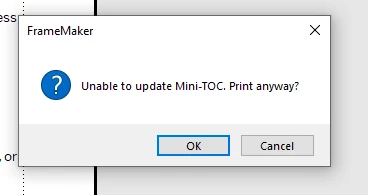
 

However, I didn't insert a Mini-TOC in this file and when I go to Insert>Table of Contents> Delete Mini-TOC is disabled. Any idea why this could be happening? Do I just create the file from scratch again? 


Thank you!


3 replies

Barb Binder
Community Expert
Community Expert
June 1, 2025

Generating a mini-TOC in a document adds an MTOC reference page and paragraph styles that have an MTOC suffix. Are either of these present in the file?


~Barb


EDIT: somehow I didn't scroll far enough down to see Matt's answer, and repeated it. 😞

~Barb at Rocky Mountain Training
Matt-Tech Comm Tools
Community Expert
Community Expert
May 28, 2025

Hi Andrea, 

If Fm thinks you have a MiniTOC in there, you can use Find/Change in two different ways to locate the offending MTOC.

First, search for Marker of Type: Hypertext

Then, if that doesn't solve the issue, check your reference pages for a MTOC page.

On that page, check the paragraph tags,

and then search your doc for the Paragraph Format(s) shown.

In my case, it's showing a Heading1MTOC paragraph style is in use.

You might also look at your Paragraph Catalog to identify any MTOC entries. Here's what mine looked like


Here's a video to explain

https://www.youtube.com/watch?v=VPM76rZj6rU


-Matt Sullivan, FrameMaker Course Creator, Author, Trainer, Consultant
Jeff_Coatsworth
Community Expert
Community Expert
May 26, 2025

Somehow it thinks you've got one in there - does Print anyway work fine if you select OK?

Participant
May 26, 2025

Hi Jeff, yes, when I click OK and print everything looks good; all styles look good and my links work. I'm just worried this could cause an issue later on. 

Jeff_Coatsworth
Community Expert
Community Expert
May 26, 2025

Well, if you didn't add one yourself, it may be hiding on a Reference page and come in when the file was created.