Known Participant
June 11, 2012
Answered

How to Find fonts in a FM10 document

  • June 11, 2012
  • 4 replies
  • 1800 views

Could a fellow FM10 user tell me how I could search a document to find a particular font. The reason I want to do this is I have inherited a rather long document and have discovered (visually) a number of fonts that should have not been used. I suspect that there are more which just visual inspection would not reveal. I had hoped FM would have a function like Edit > Find/Change <a font name> but it does not appear to be this straightforward.

Thanks.
    This topic has been closed for replies.
    Correct answer Arnis Gubins

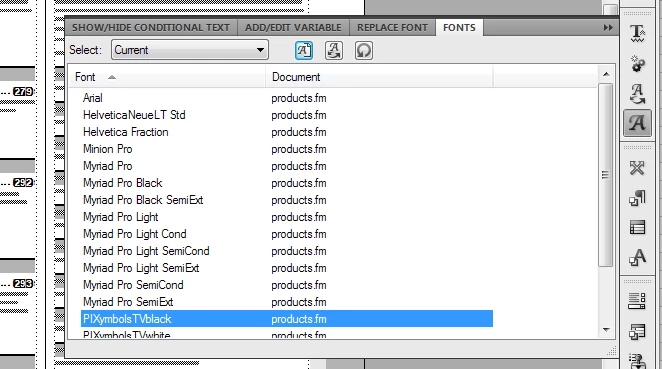
    Use the Fonts pod (View > Pods > Fonts...) to see what fonts are being used in the document, e.g.

    Highlight the font you wish to find/change and eithr click on the Font replace button (the "A" with the swooping arrow under it) or double click on the font name.

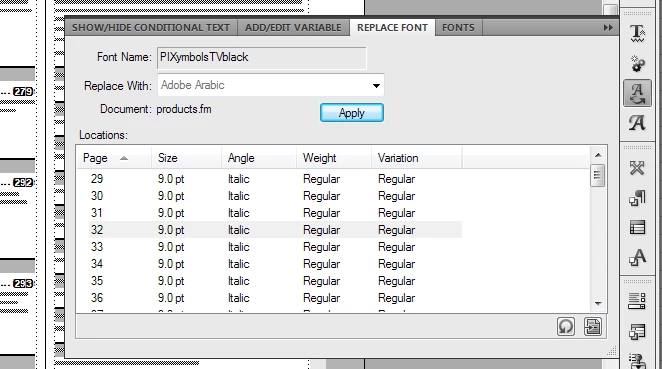
    You will then get the Font Replace panel, which shows you all instances of the font usage in the document, e.g.

    Double-clicking on the entries here will move the insertion point to the location where the font is being used.

    After inspecting, you can the decide if you want to do a global replacement using the Font Replace panel. Note: this works very well.

    4 replies

    1roachAuthor
    Known Participant
    June 12, 2012

    Thanks Mike, Arnis & 7103, your answers helped me a lot. What a good forum this is!

    Arnis Gubins
    Arnis GubinsCorrect answer
    Inspiring
    June 11, 2012

    Use the Fonts pod (View > Pods > Fonts...) to see what fonts are being used in the document, e.g.

    Highlight the font you wish to find/change and eithr click on the Font replace button (the "A" with the swooping arrow under it) or double click on the font name.

    You will then get the Font Replace panel, which shows you all instances of the font usage in the document, e.g.

    Double-clicking on the entries here will move the insertion point to the location where the font is being used.

    After inspecting, you can the decide if you want to do a global replacement using the Font Replace panel. Note: this works very well.

    Inspiring
    June 11, 2012

    1. In FrameMaker 10, you can open the Fonts pod to see the fonts used in

    the document. If you know which fonts you want to replace, you can click

    on the font, then click the "Replace" button and a Replace Fonts pod

    opens to let you specify a replacement font. FM will then replace them

    all for you in one go. It's very easy. Of course, you have to be certain

    that you want to replace every instance of that font with the other.

    There is also a known bug where replacing the fonts can throw the

    letter spacing out of kilter in the replaced paragraphs. If this

    happens, the workaround is to go into the spelling checker, choose

    Dictionaries > Rehyphenate Document and FM will repair the letter spacing.

    2. You can also run Special > Index of > References > Fonts to find

    every location where a font is used. Then Ctrl+Alt-Click to go to the

    location to review it for change. The report doesn't always show every

    location because some can be hidden in a table title that is turned off,

    or on a master or reference page, etc. I don't use conditional text, but

    I believe hidden conditions don't show in the report, either. So it

    might be wise to show all conditions before running the report.

    Mike Wickham

    Bob_Niland
    Community Expert
    Community Expert
    June 11, 2012

    I don't know if FM10 has any new capabilities, but on earlier versions what I'd do is

    1. find an instance of the foul font and determine the exact name, and if possible, all other attributes.
    2. see if any Character Format is set up to define it
    3. Search by Character Tag
    4. Search by Character Format
    5. Save as MIF and search there (look for non-Catalog Character Formats too)

    You might also be able to uninstall the font, and re-open telling FM to not remember missing fonts.