arir1
Participating Frequently
January 20, 2017
Question

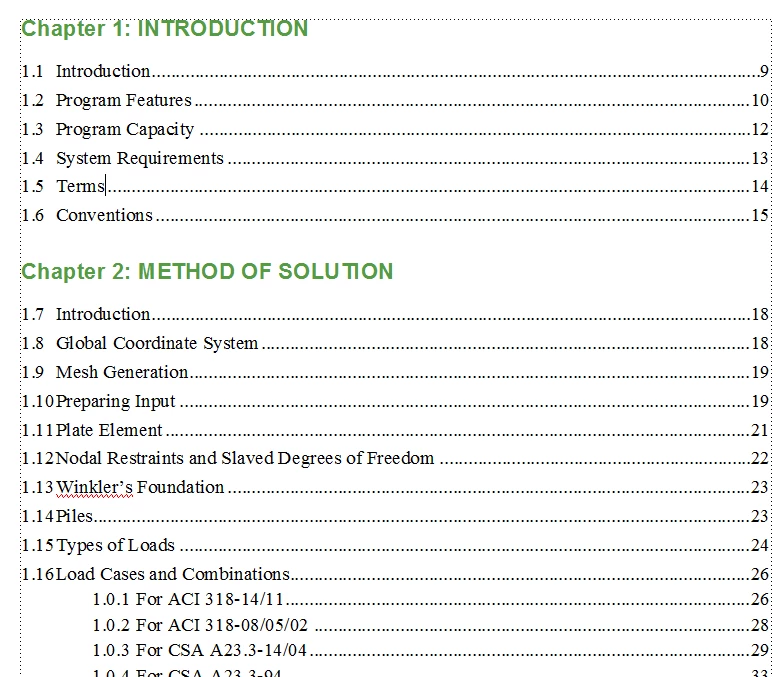
How to fix TOC?

  • January 20, 2017
  • 3 replies
  • 548 views

Hi,

I need help fixing the numbering in the Table of Contents. In Chapter 2, the numbering should not continue from Chapter 1. I should restart with 2.1. Thanks.

This topic has been closed for replies.

3 replies

arir1
arir1Author
Participating Frequently
January 23, 2017

Yes I figured it out. I went into reference pages and used <$paranumonly>

Barb Binder
Community Expert
Community Expert
January 23, 2017

Hi air

I see from this morning's new post that you now have your second chapter numbering correctly. That's awesome! 

How did you get it to work?

~Barb at Rocky Mountain Training
Barb Binder
Community Expert
Community Expert
January 20, 2017

Please start by readying this for some background how to number heads:

https://www.rockymountaintraining.com/adobe-framemaker-9-numbering-headings/

This could be any number of things. Start with making sure the numbers are set up as per the article (in both the source files and in the TOC). Once that is straightened out, open your book window.

  1. Select chapters 2-infinity
  2. Format > Document > Numbering > Chapter
  3. Continue Numbering From Previous Chapter in Book
  4. Set

~Barb at Rocky Mountain Training