Yes there is something that will do exactly what you need. If you create a separate FrameMaker document for each reusable text block you can import them into your main FrameMaker document as text insets.
This is a powerful feature, but you do need to manage it carefully from the outset. Use a meaningful naming convention for all of your inset files. That will help to avoid inset duplication and divergence that can happen after several years when more than one author is working on the document set.
FrameMaker gives you control over the formatting of the text inset - whether it uses the source or target formatting catalogs. You can also choose if the text inset update is automatic or on request.
- To insert an inset simply select File > Import File...
- Select the inset file - make sure that Import by Reference is selected.
- Set up the required properties in the Import Text Flow by Reference dialog.
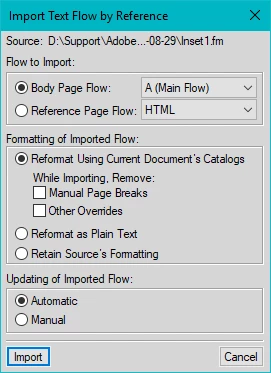
- Set the required Import properties then click Import.
- The inset text block has been added to your main document.
~ Ian




 AdChoices