Inspiring
December 24, 2023
Question

how to have this graphic

  • December 24, 2023
  • 18 replies
  • 1867 views

Hello,

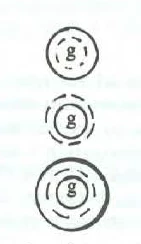
I would like to create this graphic in FrameMaker. Is it possible to create it inside Frame Maker, and how ?

 

This topic has been closed for replies.

18 replies

Inspiring
December 26, 2023

That is strange is that on the screen I can see all the graphic, but if I print it I can see only the external circle and the "g" letter (the inner circle does not appear on print). Why ?


Inspiring
December 25, 2023

About the distance between the two circles (see red arrow), I would like to set precisely it in pt. Is it possible with FM ?

By example, is it possible to set an offset of 10 pt between the external circle and the inner circle ?


And for the letter "g", I could of course put it at the center of the inner circle visually.

Personally, I would prefer keeping the same app for the book and the graphic. So I need to know what FM can do in such case.

Bob_Niland
Community Expert
Community Expert
December 25, 2023

FM accepts a variety of units in dialogs. For points, just replace whatever the default is (123", 123cm) with "pt" (123pt).

Globally, see View🞃Options

But the reference datum for any object in FM is always going to be the top left corner of its extents, and there is no object-to-object relative measuring either. So, math may be involved.

The question of workflow remains open here. If PDF and/or print is the only target, FM graphics works. If HTML/XML and/or eBook, FM graphics is likely sub-optimal. In a simple Save-as-HTML of a local re-creation of that art, the circles & text ended up getting exported as a really rough GIF.

Inspiring
December 25, 2023

I need also to set the space between the two circles, in pt. How to set it inside FM ?

Community Expert
December 25, 2023

I think it will be easier to better understand what it is you want to accomplish, if you can upload a screenshot of an entire equation with this character/s placed correctly.


It seems the figure is supposed to work like a character and in that instance, you may be better off just designing a font with the character.


OR create the figure outside of FrameMaker in Illustrator/Affinity/CorelDraw or some other vector graphic designer tool.

FrameMaker can do many things, but it does lack tools for working very detail oriented with graphics. Changing from FrameMaker to InDesign is also an option, but I am not really sure it will be a remedy for you. 

Bjørn Smalbro - FrameMaker.dk
Inspiring
December 24, 2023

Hi Bob, Hi Barb,

The problem is that for the technical book I am writing, I need to do a lot of equations and a lot of these type of circles with a letter. Do you think the better would be to do this work in Indesign ? My goal would be to have "auto centering text" for this type of work, by keeping a good quality result.

Bob_Niland
Community Expert
Community Expert
December 25, 2023

I have no experience with Indesign, but what DTP app to use for a project usually hinges on much more than how any built-in illustration tools work.

For my FM work, any vector art these days is done in an external vector editor that supports SVG. I have Adobe Illustrator available, so I use that.

Barb Binder
Community Expert
Community Expert
December 24, 2023

Hi Pierre:


This is due to the shape of the lowercase "g". You might draw an oval over the "g" and center it along with the other two circles. Visually center the "g" over the oval and then delete the oval. Not ideal, but it would work.


~Barb


Told Farms.

~Barb at Rocky Mountain Training
Inspiring
December 24, 2023

Hi,

Thank you.

I have tried to do the same, but I don't succeeded to center the inner circle inside the other circle, idem for the letter.

How to center them ?

K.Daube
Community Expert
Community Expert
December 24, 2023

When aligning, the lat thing you select is the "reference" to which you align:

  • Select the inner circle 
  • hold Schrift and select (click on) the next item
  • hold shift and select the reference item
  • Use   Graphics > Align (ESC, g, a) to get a dialogue to specify the desired alignment or use the appropriate button in the Alignment Tool bar.

See page 234 ff in https://www.daube.ch/docu/files/compendium.pdf

Inspiring
December 24, 2023

Hi K Daube,

I have succeeded to center the two circles by using the 2 buttons (see red lines).

But I don't succeeded to center the letter "g" : as you can see it is because the "g" is not centered vertically inside its frame. How to center it ?


Community Expert
December 24, 2023
Bjørn Smalbro - FrameMaker.dk
Community Expert
December 24, 2023

Hi

It is possible. I have made an, attached here, document with the figures here. Made using FrameMakers graphics tools.

Bjørn Smalbro - FrameMaker.dk